이 도구는 브라우저에서 식사 사진과 입력값을 분석·기록하는 개인용 식단 추적 도구입니다. 다만 AI 모델, OCR, PDF, HEIC 변환 기능은 사용 환경에 따라 외부 CDN 라이브러리를 불러올 수 있습니다
브라우저 기반 AI 컷아웃 툴 | 헤어 마스크·객체 선택·PNG 저장
https://uplifestyle.tistory.com/823 2026. 2. 5.
AI Cutout Studio
AI Image Cutout Tool (People / Background / Handwriting / Objects / Hair / Polygon) Upload an image, choose a mode, then refine with zoom + pan, brush/eraser, or polygon outline. Everything runs locally in your browser. Local-only · No upload ⬆ Choose i
uplifestyle.tistory.com
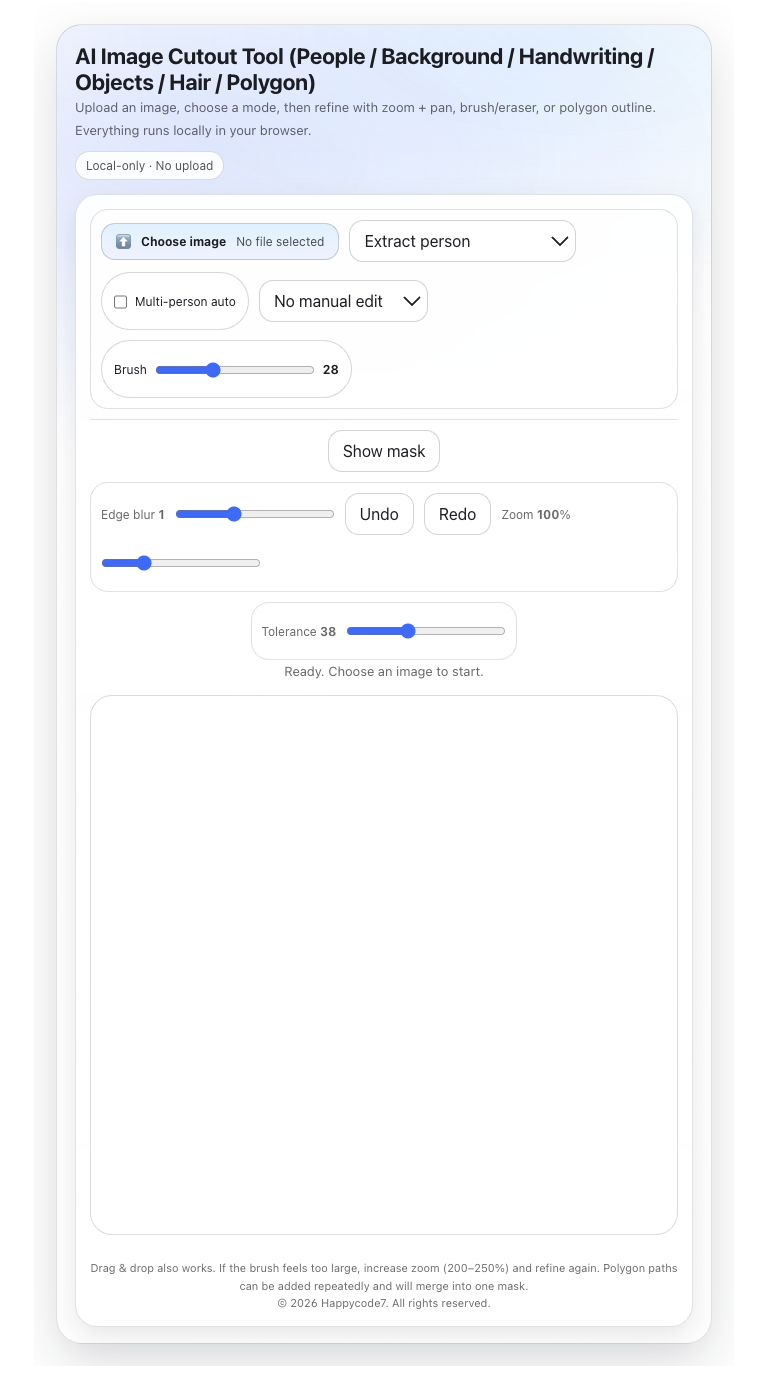
If you are looking for an AI image cutout tool, an online background remover, or a practical way to create a transparent PNG without sending your image through a remote editing workflow, this software offers a focused browser-based solution. Based on the uploaded code, the tool is structured around image cutout workflows that many international users actively search for today. It aligns with real demand around terms such as remove background online, AI background remover, hair cutout, object cutout, transparent background maker, and image to transparent PNG. These search patterns also reflect how major creative platforms describe related use cases, especially around background removal, transparent export, difficult edge refinement such as hair, and brush-based cleanup.
One reason this product is easier to position professionally is that its feature scope is relatively clear. The uploaded code includes selectable modes such as Extract person, Person (refined), Hair, Extract background, Extract handwriting, and Pick object, along with manual correction tools including brush add, eraser remove, polygon outline, zoom, pan, mask preview, undo/redo, and PNG export. In other words, this software is better presented not as a vague “AI editor,” but as a practical cutout and cleanup tool for creators, sellers, designers, marketers, and users preparing profile images, product visuals, thumbnails, social media content, and isolated assets.
From a security and trust perspective, the most important message is accuracy rather than exaggeration. The interface explicitly shows the phrase Local-only · No upload, and the code is structured so that image editing takes place inside the browser after the user selects a file. It also limits accepted file types to JPEG, PNG, and WebP, applies file size constraints, and relies on direct canvas-based editing logic rather than an account-based workflow. At the same time, the implementation also loads TensorFlow.js and BodyPix from external CDN sources at startup. Because of that, the most defensible wording is that image handling and mask editing are performed on the browser side in the provided implementation, while model libraries are fetched externally. This kind of transparent wording helps make the product more credible to overseas users who care about privacy, browser-side processing, and simpler workflows.
Another strength of this tool is that it combines automatic extraction with manual refinement. That matters because users looking for background removal often need more than a one-click result. They may also need to clean up edges, adjust masks, preserve difficult boundaries such as hair, or isolate just one object from a larger image. Major image platforms continue to emphasize these same needs: fast background removal, transparent export, difficult-edge cleanup, object removal, and text-related extraction tasks. In that sense, this software has value not as a replacement for a full design suite, but as a lightweight browser image editor focused on specific cutout tasks.
Disclaimer
This software is provided as a browser-based image editing tool for general creative and workflow use. Results may vary depending on image quality, subject boundaries, lighting, contrast, background complexity, and device/browser conditions. The provided implementation should not be described as a guaranteed professional studio replacement, forensic system, or legally determinative tool. Users are responsible for checking output quality, copyright status, portrait rights, and any commercial-use requirements before publishing or distributing edited images. Based on the uploaded code, image processing is handled in the browser interface, but external model libraries are loaded from CDN sources in the current implementation.
AI 이미지 컷아웃 도구, 온라인 배경 제거기, 혹은 이미지를 원격 편집 워크플로우로 보내지 않고 투명 PNG를 만들 수 있는 실용적인 방법을 찾고 있다면, 이 소프트웨어는 목적이 분명한 브라우저 기반 솔루션이 될 수 있습니다. 업로드된 코드를 기준으로 보면, 이 도구는 현재 많은 해외 사용자가 실제로 검색하는 이미지 컷아웃 작업 흐름에 맞춰 설계되어 있습니다. 예를 들어 remove background online, AI background remover, hair cutout, object cutout, transparent background maker, image to transparent PNG 같은 수요와 연결되는 구조를 갖추고 있습니다. 이러한 검색 표현은 주요 크리에이티브 플랫폼들이 배경 제거, 투명 배경 내보내기, 머리카락처럼 경계가 까다로운 영역 보정, 브러시 기반 정리에 대해 설명하는 방식과도 맞닿아 있습니다.
이 제품을 보다 전문적으로 포지셔닝하기 쉬운 이유는 기능 범위가 비교적 명확하게 정의되어 있기 때문입니다. 업로드된 코드에는 Extract person, Person (refined), Hair, Extract background, Extract handwriting, Pick object 같은 선택 모드가 포함되어 있으며, brush add, eraser remove, polygon outline, zoom, pan, mask preview, undo/redo, PNG export 같은 수동 보정 기능도 함께 확인됩니다. 즉, 이 소프트웨어는 막연한 “AI 편집기”로 소개되기보다, 크리에이터, 판매자, 디자이너, 마케터, 그리고 프로필 이미지, 상품 비주얼, 썸네일, 소셜 콘텐츠, 분리된 에셋을 준비하는 사용자를 위한 실용적인 컷아웃 및 정리 도구로 설명하는 편이 더 적절합니다.
보안과 신뢰 관점에서 가장 중요한 메시지는 과장이 아니라 정확성입니다. 인터페이스에는 Local-only · No upload라는 문구가 명시되어 있고, 사용자가 파일을 선택한 뒤 이미지 편집이 브라우저 내부에서 이루어지도록 구성되어 있습니다. 또한 허용 파일 형식은 JPEG, PNG, WebP로 제한되어 있으며, 용량 제한도 설정되어 있고, 계정 기반 워크플로우가 아니라 직접적인 캔버스 기반 편집 로직을 사용합니다. 다만 동시에 TensorFlow.js와 BodyPix를 시작 시 외부 CDN에서 불러오는 구조도 포함되어 있으므로, 가장 방어 가능한 표현은 “제공된 구현에서는 이미지 처리와 마스크 편집은 브라우저 측에서 이루어지며, 모델 라이브러리는 외부에서 로드된다”는 정도입니다. 이런 식의 투명한 설명은 프라이버시, 브라우저 기반 처리, 단순한 작업 흐름을 중요하게 여기는 해외 사용자에게 제품을 더 신뢰감 있게 보이게 합니다.
또 하나의 강점은 이 도구가 자동 추출과 수동 보정을 함께 지원한다는 점입니다. 이는 배경 제거를 찾는 사용자들이 단순히 배경만 지우는 것에 그치지 않고, 경계를 정리하고, 마스크를 조정하고, 머리카락처럼 어려운 경계를 살리고, 더 큰 이미지에서 특정 객체 하나만 분리하는 기능까지 필요로 하는 경우가 많기 때문입니다. 주요 이미지 플랫폼들 역시 빠른 배경 제거, 투명 배경 내보내기, 까다로운 경계 정리, 객체 제거, 텍스트 관련 추출 작업과 같은 수요를 계속 강조하고 있습니다. 그런 점에서 이 소프트웨어는 전체 디자인 툴을 대체하는 제품이라기보다, 특정 컷아웃 작업에 집중한 가벼운 브라우저 이미지 편집기로서 의미가 있습니다.
면책조항
이 소프트웨어는 일반적인 창작 및 작업 흐름 용도를 위한 브라우저 기반 이미지 편집 도구로 제공됩니다. 결과는 이미지 품질, 피사체 경계, 조명, 대비, 배경의 복잡도, 그리고 기기 및 브라우저 환경에 따라 달라질 수 있습니다. 제공된 구현을 전문 스튜디오 작업을 완전히 대체하는 보장형 도구, 포렌식 시스템, 또는 법적 판단을 확정하는 도구로 설명해서는 안 됩니다. 사용자는 편집된 이미지를 게시하거나 배포하기 전에 결과물의 품질, 저작권 상태, 초상권, 그리고 상업적 이용 가능 여부를 직접 확인할 책임이 있습니다. 업로드된 코드를 기준으로 보면, 이미지 처리는 브라우저 인터페이스 내에서 이루어지지만, 현재 구현에서는 외부 CDN을 통해 모델 라이브러리를 불러옵니다.
https://uplifestyle.tistory.com/446 2025. 7. 9.
AI 이미지 분리 도구 (인물/손글씨/배경)
AI 이미지 분리 도구 (인물/배경/손글씨/물체/머리카락/폴리곤) AI 이미지 분리 도구 (인물/배경/손글씨/물체/머리카락/폴리곤) 이미지를 업로드한 뒤 모드를 선택하세요. 확대해서 머리카락이나
uplifestyle.tistory.com
https://blog.naver.com/upttt_/224214569544
How to Add Web App to Your Home Screen
How to Add Web App to Your Home Screen For iPhone Open the website in Safari or Chrome o...
blog.naver.com
#AI배경제거 #배경제거 #누끼따기 #투명PNG #이미지컷아웃 #헤어컷아웃 #객체분리 #사진배경지우기 #이미지배경제거 #브라우저이미지편집 #AIbackgroundremover #removebackgroundonline #transparentPNG #imagecutouttool #haircutout #objectcutout #backgrounderaser #photobackgroundremover #transparentbackground #browserimageeditor #背景透過 #画像切り抜き #写真背景削除 #AI画像切り抜き #髪切り抜き #透明PNG #物体切り抜き #在线抠图 #图片去背景 #抠图工具 #透明PNG制作 #AI抠图 #照片去背景 #物体分离 #智能抠图 #eliminarfondo #recortedeimagen #PNGtransparente #recorteconIA #quitarfondodefoto #editorimagenonline #fondotransparente #recortarfotoAI background remover, remove background online, image cutout tool, transparent PNG maker, hair cutout, object cutout, background eraser, photo background remover, browser image editor, AI image editor, 배경제거, 누끼따기, 투명PNG, 이미지컷아웃, 헤어컷아웃, 객체분리, 背景透過, 画像切り抜き, 写真背景削除, AI画像切り抜き, 图片去背景, 抠图工具, 透明PNG, AI抠图, eliminar fondo, recorte de imagen, PNG transparente, recorte con IA, quitar fondo de foto, editor de imagen
'+Practical software for daily life > Everyday Life & Software' 카테고리의 다른 글
| 의료수가 자동조정·분쟁예방 도구 | GoodMorning Pro+ Medical Fee Adjustment & Dispute Prevention (3) | 2026.04.22 |
|---|---|
| 로컬 기반 AI 식단 관리기 | Photo Food Log·Nutrition Tracker·OCR Scan (2) | 2026.04.21 |
| 로컬 보안형 패션 트렌드 분석기 Fashion Trend Analyzer (0) | 2026.04.20 |
| 로컬 크로마키·CMYK 편집툴 Filtering Filter (0) | 2026.04.18 |
| 로그인 없는 인터벌 루틴관리 운동플래너 |No-Login Workout Planner (0) | 2026.04.17 |


