이 도구는 브라우저에서 식사 사진과 입력값을 분석·기록하는 개인용 식단 추적 도구입니다. 다만 AI 모델, OCR, PDF, HEIC 변환 기능은 사용 환경에 따라 외부 CDN 라이브러리를 불러올 수 있습니다
복잡한 도형 다이컷 메이커 | SVG·PDF 커트라인 생성기 | Online Die-Cut Guide Maker
https://uplifestyle.tistory.com/824 2026. 2. 6.
Complex Shape Die-Cut Maker (Domusong)
Complex Shape Die-Cut Maker Detects complex outlines and renders production guides: cut line, bleed box, fold lines, and safe margin. Runs locally in your browser. No images are uploaded. Choose file Bleed (mm) Rebuild Edit mode Engine: loading… Cut line
uplifestyle.tistory.com
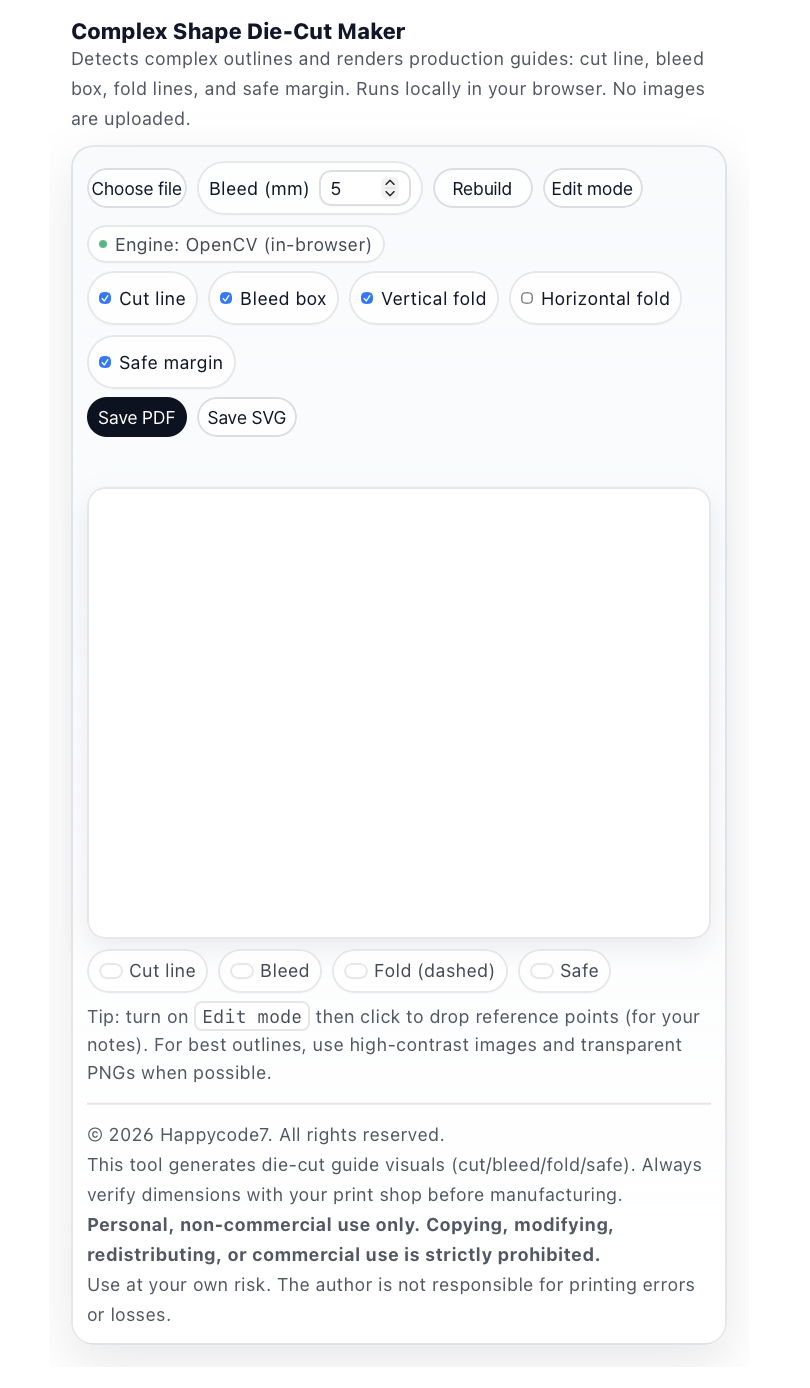
If you want a more organized way to turn complex outlines into a cleaner print workflow, Complex Shape Die-Cut Maker is built for exactly that purpose. This browser-based tool helps you turn detailed image edges into practical production guides such as cut lines, bleed boxes, fold lines, and safe margins, without forcing you into heavy desktop software. Based on the uploaded code, it supports PNG, JPEG, and WEBP files, and lets you export the results as PDF or SVG.
What makes this tool useful is that it is not limited to simple image display. It is designed to help you handle guide elements that are often needed during real print preparation. You can adjust bleed values, show or hide cut lines, bleed boxes, horizontal and vertical fold lines, and safe margins, so the workspace can be tuned to match your actual production goal. That makes it well suited for workflows such as sticker preparation, custom cut-shape reference checking, basic packaging dieline review, and print-ready outline planning.
Another important point is its local browser workflow. According to the visible product copy in the code, the tool runs directly in the browser and does not upload images externally. That makes it easier to present to users who want a faster, lower-friction workflow or who prefer not to move artwork through unnecessary upload steps. In other words, this software is best understood as a lightweight, direct, browser-based print preparation tool, rather than a cloud-heavy editing service.
From an implementation perspective, the tool also goes beyond decorative visual effects. The uploaded code shows an OpenCV-based in-browser processing path together with a local fallback engine, which supports a practical workflow for handling complex outlines as much as possible inside the browser. This makes sense for users who want to review outline-based guides quickly and export them immediately as PDF or SVG without adding installation overhead.
At the same time, it is most accurate to present this product as a die-cut guide visual generator and print-preparation support tool. The code also includes guidance that users should confirm measurements with their print shop before final production, along with limitation-of-liability language related to print errors or losses. For that reason, the most professional and reliable positioning is to describe it as a browser-based die-cut guide maker that helps you review and organize files before production, rather than as a guaranteed prepress replacement or manufacturing approval system.
In short, Complex Shape Die-Cut Maker helps you simplify the process of working with complex shapes by reducing installation burden, keeping the workflow inside the browser, and organizing the production guides you need in a more visual and practical way. For work involving stickers, custom cut graphics, simple packaging reference layouts, or print outline checks, it can serve as a focused and useful browser-based solution without overstating what the software does.
Disclaimer
This software is provided as a browser-based die-cut guide and print-preparation tool for general creative and reference use. Results may vary depending on image quality, contrast, transparency, outline complexity, browser conditions, device performance, and export settings. This tool should not be described or relied upon as a manufacturing approval system, print-quality guarantee service, or final production validation tool. Users are responsible for reviewing cut lines, bleed, fold guides, safe margins, dimensions, file compatibility, copyright status, and commercial-use rights before production or distribution. Final specifications should always be confirmed with the print shop before manufacturing. The author is not responsible for printing errors, production loss, file interpretation differences, or downstream commercial damages. Any usage restrictions included in the provided code should also be observed.
복잡한 외곽선을 조금 더 정돈된 출력 작업 흐름으로 정리하고 싶으시다면, Complex Shape Die-Cut Maker는 바로 그런 용도로 사용할 수 있는 브라우저 기반 도구입니다. 이 도구는 이미지의 복잡한 윤곽을 바탕으로 cut line, bleed box, fold line, safe margin 같은 제작 가이드를 한 화면에서 정리해드리고, 무거운 설치형 프로그램 없이도 비교적 가볍고 빠르게 작업을 이어갈 수 있도록 구성되어 있습니다. 업로드된 코드 기준으로 PNG, JPEG, WEBP 파일을 지원하고, 결과는 PDF와 SVG로 저장하실 수 있습니다.
이 도구의 장점은 단순히 이미지를 보여주는 데서 끝나는 것이 아니라, 실제 출력 준비 과정에서 필요한 가이드를 실무적으로 다룰 수 있다는 점입니다. 사용자는 bleed 값 조정, cut line 표시, bleed box 표시, 가로·세로 fold line 설정, safe margin 표시 같은 옵션을 통해 작업 화면을 목적에 맞게 조정할 수 있습니다. 그래서 스티커 제작, 커스텀 커팅 참고선 확인, 패키지용 기초 다이라인 검토처럼 출력 전 준비 단계에서 특히 유용하게 활용하실 수 있습니다.
또 한 가지 분명하게 설명드릴 수 있는 부분은 로컬 처리 방식입니다. 코드에 표시된 안내 문구 기준으로 이 도구는 브라우저 안에서 실행되며 이미지가 외부로 업로드되지 않도록 구성되어 있습니다. 그래서 별도의 업로드 과정 없이 빠르게 작업하고 싶으신 분, 또는 작업 파일이 외부로 이동하는 과정을 줄이고 싶으신 분께도 비교적 명확한 장점을 드릴 수 있습니다. 즉, 이 제품은 계정 기반 편집 서비스나 복잡한 클라우드 워크플로우보다는, 가볍고 직접적인 브라우저 기반 출력 준비 도구로 이해하시는 것이 가장 적절합니다.
구현 측면에서도 이 도구는 단순한 시각 효과만 제공하는 구조가 아닙니다. 업로드된 코드에는 OpenCV 기반 브라우저 내 처리 방식과 로컬 fallback 엔진이 함께 반영되어 있어서, 복잡한 외곽선을 가능한 한 브라우저 안에서 처리하려는 흐름을 확인할 수 있습니다. 이 점은 설치 부담 없이 빠르게 윤곽선 기반 가이드를 확인하고, 결과를 바로 PDF 또는 SVG로 내보내고 싶으신 분들께 잘 맞는 방식입니다.
다만 이 도구는 어디까지나 die-cut guide visual 생성 및 출력 준비 보조 도구로 소개드리는 것이 가장 정확합니다. 코드 하단 안내에도 최종 제작 전에 반드시 인쇄소와 치수를 확인하라는 문구가 포함되어 있고, 인쇄 오류나 손실에 대한 책임 제한 문구도 명시되어 있습니다. 그래서 이 제품은 제작 전 확인을 돕는 브라우저 기반 다이컷 가이드 생성기처럼 설명드리는 것이 가장 전문적이고 안전합니다. 결과물을 바로 제조 승인용 파일이라고 단정하기보다는, 출력 전 검토와 정리에 도움을 드리는 실무형 보조 도구로 보시는 것이 코드 내용과 가장 잘 맞습니다.
정리하면, Complex Shape Die-Cut Maker는 복잡한 형태의 외곽선을 다루실 때 설치 부담을 낮추고 작업 흐름을 단순화하면서, 필요한 제작 가이드를 시각적으로 정리할 수 있도록 도와드리는 브라우저 기반 솔루션입니다. 스티커, 커스텀 컷 디자인, 간단한 패키지 참고 가이드, 출력용 윤곽선 확인처럼 정리된 제작 가이드가 필요한 작업에서 과장 없이 실용적으로 활용하실 수 있습니다.
면책조항
본 소프트웨어는 일반적인 창작 및 출력 준비 참고용으로 제공되는 브라우저 기반 다이컷 가이드 생성 도구입니다. 결과는 이미지 품질, 대비, 투명도, 외곽선 복잡도, 브라우저 환경, 기기 성능, 저장 설정 등에 따라 달라질 수 있습니다. 본 도구는 제조 승인 시스템, 인쇄 품질 보증 서비스, 또는 최종 생산 확정 도구로 간주되거나 그에 의존되어서는 안 됩니다. 사용자는 제작 또는 배포 전에 커트라인, 블리드, 접지 가이드, 안전 여백, 치수, 파일 호환성, 저작권 상태 및 상업적 이용 가능 여부를 직접 검토해야 합니다. 최종 제작 사양은 반드시 인쇄소와 재확인해야 합니다. 저작자는 인쇄 오류, 제작 손실, 파일 해석 차이 또는 그로 인한 상업적 손해에 대해 책임지지 않습니다. 제공된 코드에 포함된 사용 제한 사항도 함께 준수해야 합니다.
https://uplifestyle.tistory.com/456 2025. 7. 10.
복잡 도형 도무송 제작 도구
복잡 도형 도무송 제작 도구 복잡한 윤곽을 자동 인식하고 수정할 수 있습니다. 칼선, 접는선, 도련선, 안전 여백 가이드를 생성하고 PDF·SVG로 저장할 수 있습니다. 이미지는 브라우저 안에서만
uplifestyle.tistory.com
https://blog.naver.com/upttt_/224214569544
How to Add Web App to Your Home Screen
How to Add Web App to Your Home Screen For iPhone Open the website in Safari or Chrome o...
blog.naver.com
#복잡한도형다이컷메이커 #커트라인생성기 #다이컷가이드 #스티커제작툴 #인쇄용SVG #인쇄용PDF #브라우저기반툴 #로컬처리 #이미지업로드없음 #패키지다이라인
#ComplexShapeDieCutMaker #CutlineGenerator #DieCutGuide #StickerMaker #PrintReadySVG #PrintReadyPDF #BrowserBasedTool #LocalProcessing #NoImageUpload #PackagingDieline
#複雑形状ダイカットメーカー #カットライン生成 #ダイカットガイド #ステッカー作成ツール #印刷用SVG #印刷用PDF #ブラウザベースツール #ローカル処理 #画像アップロード不要 #パッケージダイライン
#复杂形状模切生成器 #切线生成工具 #模切指南 #贴纸制作工具 #可打印SVG #可打印PDF #浏览器工具 #本地处理 #无需上传图片 #包装刀版线
#CreadorDeTroquelComplejo #GeneradorDeLineaDeCorte #GuiaDeTroquel #HerramientaParaStickers #SVGParaImpresion #PDFParaImpresion #HerramientaEnNavegador #ProcesamientoLocal #SinSubirImagenes #DielinePackaging
'+Practical software for daily life > Everyday Life & Software' 카테고리의 다른 글
| 외부 전송 없는 판매자 운영도구 | All-in-One Local-First Seller Toolkit (2) | 2026.04.23 |
|---|---|
| 의료수가 자동조정·분쟁예방 도구 | GoodMorning Pro+ Medical Fee Adjustment & Dispute Prevention (3) | 2026.04.22 |
| 브라우저 기반 AI 컷아웃 툴 | 헤어 마스크·객체 선택·PNG 저장 AI Background Remover | Hair Cutout·Object Select·PNG Export (0) | 2026.04.20 |
| 로컬 보안형 패션 트렌드 분석기 Fashion Trend Analyzer (0) | 2026.04.20 |
| 로컬 크로마키·CMYK 편집툴 Filtering Filter (0) | 2026.04.18 |


