몰래카메라 1차 점검 도구 | Safety Scan — No-Upload Hidden Camera Self-Check for Hotels, Rentals & Travel Priva
Safety Scan은 업로드 없이 브라우저에서 실행되는 개인 공간 안전 점검 보조 도구입니다. 카메라 반사 스캔, 고주파 신호 확인, BLE 주변 기기 확인 기능을 통해 호텔, 단기 숙소, 공유 오피스 등 낯선 공간에서 사용자가 직접 1차 프라이버시 점검을 진행할 수 있도록 돕습니다. 민감한 공간 데이터를 외부 서버로 전송하지 않고, 필요한 권한도 사용자가 직접 실행한 기능에서만 사용하는 구조가 핵심 보안 강점입니다.

Safety Scan — Hidden Camera Self-Check (Offline)
Language Choose your preferred language. Saved on this device only. Install Some embedded blog pages may not show automatic prompts. Use your browser menu to install / add to home screen. Safety Scan — Hidden Camera Self-Check (Offline) Runs locally in y
uplifestyle.tistory.com
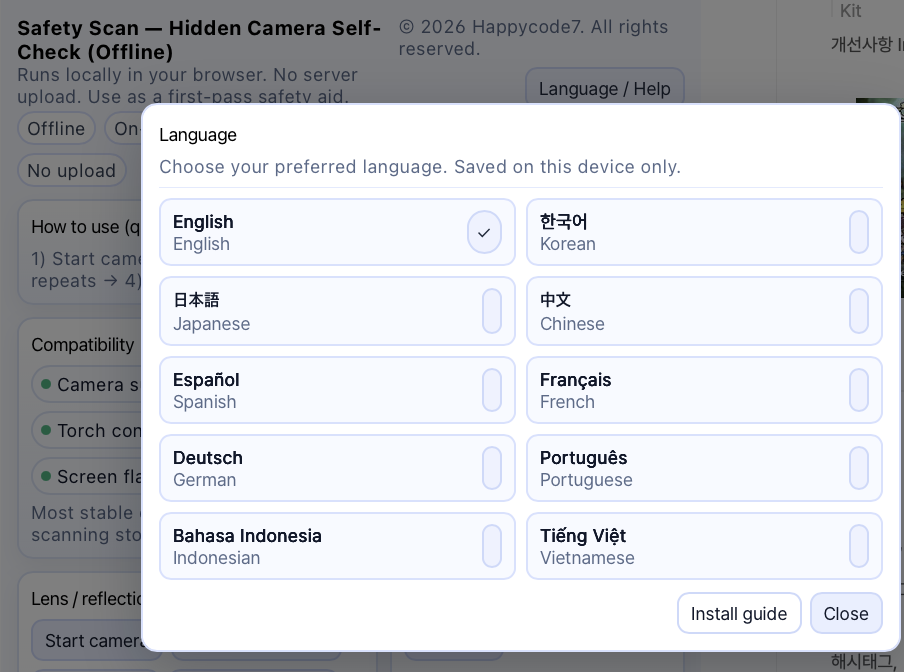
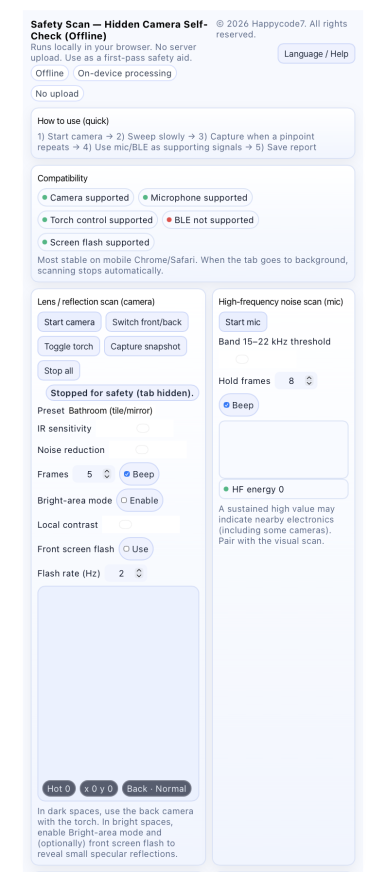

Safety Scan — Hidden Camera Self-Check는 사용자의 민감한 공간 정보를 외부 서버로 업로드하지 않고, 브라우저 안에서 직접 점검 흐름을 진행하도록 설계된 로컬 중심 보안 도구입니다. 호텔, 숙소, 공유 오피스, 단기 임대 공간처럼 사적인 환경을 확인할 때 사진·영상·음성 데이터가 외부 분석 서버로 전송되는 부담을 줄일 수 있습니다.
카메라, 마이크, BLE와 같은 민감한 권한은 사용자가 직접 기능을 실행할 때만 사용되는 구조이므로, 불필요한 자동 접근이나 백그라운드 실행 위험을 낮추는 데 도움이 됩니다. 또한 앱 설치 없이 브라우저에서 실행되기 때문에 출처가 불분명한 프로그램 설치로 인한 보안 위험을 줄일 수 있습니다.
이 도구는 의심 지점을 사용자가 직접 확인하고 기록할 수 있도록 돕는 1차 점검 보조 방식입니다. 외부 업로드형 검사 서비스보다 개인 공간 노출을 줄이고, 사용자가 권한과 점검 과정을 직접 통제할 수 있다는 점이 핵심적인 보안 장점입니다.
특장점
1. 업로드 없는 브라우저 기반 점검
별도 앱 설치나 파일 업로드 없이 브라우저에서 실행되어, 숙소 내부 사진이나 사적인 공간 정보가 외부로 전송되는 부담을 줄입니다.
2. 카메라 기반 렌즈·반사점 스캔
거울, 콘센트, 환풍구, 충전기, 멀티탭, 감지기 주변처럼 작은 반사점이 생기기 쉬운 위치를 사용자가 직접 확인할 수 있도록 돕습니다.
3. 밝은 공간 모드와 전면 스크린 플래시 보조
조명 환경에 따라 반사점 확인이 어려울 수 있는 상황을 보조해, 다양한 숙소 환경에서 1차 점검을 진행하기 쉽게 만듭니다.
4. 고주파 마이크 신호 확인 기능
주변 전자기기에서 발생할 수 있는 고주파 신호를 참고용으로 확인할 수 있어, 시각 점검만으로 부족한 부분을 보조합니다.
5. BLE 기반 주변 기기 확인
브라우저와 기기 환경이 허용하는 범위 안에서 주변 블루투스 기기를 확인할 수 있어, 낯선 공간에서 의심 장치 여부를 참고하는 데 활용할 수 있습니다.
6. 사용자 권한 중심 구조
카메라, 마이크, BLE 기능은 사용자가 직접 실행해야 작동하므로, 민감한 권한 사용 흐름을 사용자가 인지하고 통제할 수 있습니다.
7. 여행·출장·단기 숙소에 적합한 즉시 점검 도구
전문 장비를 대체하는 것이 아니라, 호텔 체크인 직후나 낯선 공간 입실 직후 바로 실행할 수 있는 1차 안전 확인 도구로 활용하기 좋습니다.
여행, 출장, 단기 숙소, 호텔, 게스트하우스, 공유 오피스처럼 낯선 공간을 이용할 때 가장 먼저 확인하고 싶은 것은 개인의 안전과 프라이버시입니다. Safety Scan — Hidden Camera Self-Check는 사용자가 브라우저 안에서 직접 공간을 점검할 수 있도록 만든 업로드 없는 몰래카메라 1차 점검 보조 도구입니다.
이 도구는 별도 앱 설치나 파일 업로드 없이 브라우저에서 실행되며, 카메라를 이용한 렌즈·반사점 스캔, 밝은 공간 모드, 전면 스크린 플래시 보조, 고주파 마이크 신호 확인, BLE 기반 의심 기기 확인 기능을 제공합니다. 사용자는 거울, 콘센트, 감지기, 환풍구, 충전기, 멀티탭, 액자 주변처럼 작은 구멍이나 반사점이 생기기 쉬운 부분을 천천히 훑어보며 1차 점검을 진행할 수 있습니다.
특히 해외 사용자에게는 hidden camera detector, hotel room safety check, Airbnb hidden camera check, vacation rental privacy tool, no-upload privacy scanner, browser-based security check*같은 검색 의도와 잘 맞습니다. 이 표현들은 단순한 키워드 나열이 아니라, 실제 사용 상황인 호텔 체크인, 여행 숙소 확인, 단기 임대 공간 점검, 개인 프라이버시 보호 흐름과 자연스럽게 연결됩니다.
Safety Scan의 강점은 “탐지 장비를 대체한다”가 아니라, 사용자가 즉시 실행할 수 있는 첫 번째 안전 확인 단계를 제공한다는 점입니다. 카메라 반사 스캔은 같은 위치에서 반복되는 작은 밝은 점을 확인하는 데 도움을 주고, 마이크 기반 고주파 확인은 주변 전자기기 신호를 참고하는 보조 수단으로 사용할 수 있습니다. BLE 확인 기능은 브라우저와 기기 환경이 허용하는 범위 안에서 주변 블루투스 기기를 확인하는 데 활용할 수 있습니다.
보안 측면에서도 이 도구는 사용자의 민감한 환경 정보를 서버로 올리지 않는 구조를 강조할 수 있습니다. 카메라와 마이크 권한은 사용자가 기능을 실행할 때만 필요하며, 결과 확인과 리포트 저장도 사용자의 기기 중심으로 진행됩니다. 숙소 내부 사진, 사적인 공간, 위치성 정보가 포함될 수 있는 점검 상황에서는 이런 로컬 처리 방식이 중요한 장점이 됩니다.
다만 이 도구는 전문 감식 장비나 수사기관의 조사를 대신하지 않습니다. 브라우저, 운영체제, 카메라 성능, 조명, 반사 각도, BLE 지원 여부에 따라 결과가 달라질 수 있습니다. 의심 정황이 있다면 임의로 분해하거나 훼손하지 말고, 사진·영상 기록을 남긴 뒤 숙소 플랫폼, 관리자, 현지 기관 또는 수사기관에 문의하는 것이 안전합니다.
보안 강점
이 도구는 업로드 기반 분석 서비스와 달리 사용자의 사적인 공간 데이터를 서버로 전송하지 않는 방향으로 설계되어 있습니다. 숙소 내부, 욕실, 침실, 사무실처럼 민감한 장소를 점검할 때 불필요한 외부 전송을 줄일 수 있다는 점이 핵심입니다.
또한 카메라, 마이크, BLE처럼 민감한 권한은 사용자가 직접 실행해야 작동하는 구조라서, 사용자는 기능별로 필요한 권한을 인지하고 사용할 수 있습니다. 탭이 백그라운드로 이동하면 스캔이 자동 중지되는 안내도 포함되어 있어, 장시간 무심코 작동되는 상황을 줄이는 데 도움이 됩니다.
주의사항
이 도구는 몰래카메라 탐지를 보장하지 않습니다. 반사점이 보인다고 해서 반드시 카메라라는 뜻은 아니며, 고주파 신호나 BLE 장치가 보인다고 해서 곧바로 불법 촬영 장비라고 단정할 수 없습니다. 반대로 조명, 각도, 장치 은폐 방식, 브라우저 제한 때문에 실제 장치를 놓칠 수도 있습니다.
의심되는 장치를 발견했을 경우 직접 분해하거나 제거하지 말고, 가능한 한 안전한 거리에서 기록을 남긴 뒤 공식 플랫폼, 숙소 관리자, 보안 담당자 또는 현지 법 집행기관에 문의해야 합니다. 타인의 공간이나 장비를 무단으로 스캔하거나 불법 목적으로 사용하는 것은 금지됩니다.
면책조항
본 도구는 호텔, 숙소, 사무실 등에서 사용할 수 있는 1차 안전 점검 보조 도구이며, 몰래카메라 또는 전자기기 탐지를 보장하지 않습니다. 결과는 참고용이며 최종 판단, 신고, 법적 조치, 증거 판단은 전문가·플랫폼·수사기관의 영역입니다. 사용자는 각 국가와 지역의 법률, 개인정보보호 규정, 시설 이용 규칙을 준수해야 합니다. 본 도구는 브라우저 기반 로컬 처리를 지향하며, 카메라·마이크·BLE 권한은 사용자가 직접 실행한 기능에서만 사용됩니다.
Security Strengths
Safety Scan — Hidden Camera Self-Check is a local-first security tool designed to let users perform a privacy check directly inside the browser without uploading sensitive room information to an external server. When checking private environments such as hotels, accommodations, shared offices, and short-term rental spaces, it can help reduce the burden of sending photos, video, or audio data to an outside analysis service.
Sensitive permissions such as camera, microphone, and BLE access are used only when the user directly activates each function. This structure helps reduce unnecessary automatic access or background operation risks. Since the tool runs in the browser without requiring a separate app installation, it can also reduce the security risks associated with installing unknown or untrusted software.
This tool works as a first-step inspection assistant that helps users manually check and record suspicious areas. Compared with upload-based inspection services, its key security advantage is that it reduces exposure of private space data and allows users to directly control permissions and the checking process.
Key Features
1. No-upload browser-based check
The tool runs directly in the browser without requiring a separate app installation or file upload, helping reduce the risk of sending room photos or private space information outside the user’s device.
2. Camera-based lens and reflection scanning
Users can manually inspect areas where small reflections may appear, such as mirrors, power outlets, vents, chargers, power strips, detectors, and nearby objects.
3. Bright room mode and front-screen flash assistance
These features support reflection checking in different lighting conditions, making it easier to perform a first-step inspection in various accommodation environments.
4. High-frequency microphone signal check
The tool can provide a reference check for high-frequency signals that may come from nearby electronic devices, supporting the visual inspection process.
5. BLE-based nearby device review
Within the limits allowed by the browser and device environment, users can review nearby Bluetooth devices and use the information as a reference when checking an unfamiliar space.
6. User-controlled permission structure
Camera, microphone, and BLE functions operate only when the user directly starts them, allowing users to understand and control how sensitive permissions are used.
7. Practical for travel, business trips, and short-term stays
Rather than replacing professional detection equipment, this tool is useful as an immediate first-step privacy and safety check after entering a hotel room, rental space, guesthouse, or shared office.
No-Upload Browser-Based Privacy & Safety Check for Hotels, Rentals, and Unfamiliar Spaces
When using unfamiliar spaces such as travel accommodations, business trip lodging, short-term rentals, hotels, guesthouses, or shared offices, one of the first things many people want to check is personal safety and privacy. Safety Scan — Hidden Camera Self-Check is a no-upload hidden camera first-check assistant designed to help users inspect a space directly inside their browser.
This tool runs in the browser without requiring a separate app installation or file upload. It provides camera-based lens and reflection scanning, bright room mode, front-screen flash assistance, high-frequency microphone signal checking, and BLE-based nearby device review features. Users can slowly inspect areas where tiny holes, reflections, or concealed devices may appear, such as mirrors, power outlets, detectors, vents, chargers, power strips, picture frames, and other objects around the room.
For international users, this tool naturally matches search intent such as hidden camera detector, hotel room safety check, Airbnb hidden camera check, vacation rental privacy tool, no-upload privacy scanner, and browser-based security check. These phrases are not just keywords; they connect directly to real user situations such as hotel check-in, checking a travel rental, inspecting a short-term stay, and protecting personal privacy in unfamiliar environments.
The strength of Safety Scan is not that it replaces professional detection equipment. Its value is that it provides an immediate first safety-check step that users can run on their own. The camera reflection scan can help users look for small bright points that repeatedly appear in the same position. The microphone-based high-frequency check can be used as a supporting reference for nearby electronic signals. The BLE check feature can help review nearby Bluetooth devices within the limits allowed by the browser and device environment.
From a security perspective, this tool emphasizes a structure that does not upload sensitive environmental information to a server. Camera and microphone permissions are required only when the user actively runs the related feature, and result checking or report saving is centered on the user’s own device. In situations where hotel room photos, private spaces, or location-related information may be involved, this local-processing approach can be an important advantage.
However, this tool does not replace professional forensic equipment or an official investigation. Results may vary depending on the browser, operating system, camera quality, lighting, reflection angle, and BLE support. If there is a suspicious situation, users should not dismantle, damage, or remove objects on their own. Instead, they should record photos or videos from a safe distance and contact the accommodation platform, property manager, security staff, local authorities, or law enforcement when necessary.
Security Strengths
Unlike upload-based analysis services, this tool is designed to avoid sending private space data to an external server. This is especially important when checking sensitive places such as hotel rooms, bathrooms, bedrooms, offices, or other private areas, where reducing unnecessary external transmission can help protect user privacy.
Sensitive permissions such as camera, microphone, and BLE access are also designed to work only when the user directly activates each function. This allows users to understand which permission is needed for each feature before using it. The tool also includes guidance that scanning may stop when the browser tab moves to the background, helping reduce the risk of long-running unattended operation.
Important Notes
This tool does not guarantee hidden camera detection. A visible reflection point does not necessarily mean that a camera is present. A high-frequency signal or BLE device does not automatically mean that illegal recording equipment exists. On the other hand, actual devices may still be missed due to lighting conditions, angles, concealment methods, browser restrictions, or hardware limitations.
If users discover a suspicious object or device, they should not dismantle or remove it themselves. They should document the situation from a safe distance and contact the official platform, property manager, security personnel, or local law enforcement. Unauthorized scanning of someone else’s space or equipment, or using this tool for illegal purposes, is strictly prohibited.
Disclaimer
This tool is a first-step safety check assistant for hotels, accommodations, offices, and similar spaces. It does not guarantee the detection of hidden cameras or electronic devices. All results are for general reference only. Final judgment, reporting, legal action, and evidence assessment should be handled by qualified professionals, platforms, security personnel, or law enforcement agencies.
Users are responsible for complying with the laws, privacy regulations, and facility rules of each country, region, and property. This tool is designed with browser-based local processing in mind, and camera, microphone, and BLE permissions are used only when the user actively runs the related feature.
How to Add Web App to Your Home Screen
How to Add Web App to Your Home Screen For iPhone Open the website in Safari or Chrome o...
blog.naver.com
https://uplifestyle.tistory.com/559 2025. 8. 14. 최초 업로드
대놓고? – 몰래카메라 찾기 도우미
앱 설치 안내Tistory 글 내부에서는 자동 설치 프롬프트가 제한될 수 있습니다. 아래 방법으로 홈 화면에 추가하세요.안드로이드 크롬: 우측 상단 메뉴 → 설치 또는 홈 화면에 추가아이폰 사파리:
uplifestyle.tistory.com
#HiddenCameraDetector #HotelRoomSafetyCheck #AirbnbHiddenCameraCheck #VacationRentalPrivacy #NoUploadPrivacyScanner #BrowserBasedSecurityCheck #TravelSafetyTool #RoomInspectionTool #BluetoothDeviceCheck #LocalProcessingTool
#몰래카메라점검 #호텔안전점검 #숙소프라이버시 #여행안전도구 #에어비앤비점검 #브라우저보안도구 #업로드없는도구 #로컬처리도구 #블루투스기기확인 #사생활보호
#隠しカメラ検出 #ホテル安全チェック #宿泊先プライバシー #旅行安全ツール #民泊カメラチェック #ブラウザセキュリティ #アップロード不要 #ローカル処理 #Bluetooth機器確認 #プライバシー保護
#隐藏摄像头检测 #酒店安全检查 #住宿隐私保护 #旅行安全工具 #民宿摄像头检查 #浏览器安全检查 #无需上传 #本地处理工具 #蓝牙设备检查 #隐私保护
#DetectorDeCámarasOcultas #SeguridadEnHoteles #PrivacidadEnAlojamientos #HerramientaDeSeguridadParaViajes #RevisiónDeAirbnb #SeguridadEnNavegador #SinSubidaDeArchivos #ProcesamientoLocal #RevisiónDeBluetooth #ProtecciónDePrivacidad
hidden camera detector, hotel room safety check, Airbnb hidden camera check, vacation rental privacy, no upload privacy scanner, browser based security check, travel safety tool, room inspection tool, Bluetooth device check, local processing tool, 몰래카메라점검, 호텔안전점검, 숙소프라이버시, 여행안전도구, 에어비앤비점검, 브라우저보안도구, 업로드없는도구, 로컬처리도구, 블루투스기기확인, 사생활보호, 隠しカメラ検出, ホテル安全チェック, 宿泊先プライバシー, 旅行安全ツール, アップロード不要, 隐藏摄像头检测, 酒店安全检查, 住宿隐私保护, 无需上传, 隐私保护, detector de cámaras ocultas, seguridad en hoteles, privacidad en alojamientos, herramienta de seguridad para viajes, procesamiento local


