보안 특장점
CEC Pro는 사용자의 입력값을 자동 업로드하지 않고 브라우저 안에서 컴퓨터 환경을 점검하는 No-Upload Browser Check Tool입니다. 불필요한 파일 전송이나 계정 연동 없이 브라우저, 권한, 입력 상태, 팝업, 다운로드, 카메라, 클립보드, 저장공간 같은 업무 환경 요소를 직접 확인할 수 있어 외부 서버 의존도를 줄이는 데 도움이 됩니다.
또한 Privacy Mode를 통해 외부 연결이 필요한 점검을 제한할 수 있으며, 네트워크 관련 확인은 자동으로 실행되지 않고 사용자가 직접 선택한 경우에만 진행됩니다. 이런 구조는 가짜 업로드 페이지, 불필요한 외부 전송, 의심스러운 권한 요청을 피하고 싶은 사용자에게 더 안전한 사용 흐름을 제공합니다.
비밀번호 입력 비교, 키보드 코드 테스트, 클립보드 확인 기능은 보안 키보드, 입력기, 브라우저 확장 프로그램, 자동완성 등으로 인해 문자가 예상과 다르게 입력되는 상황을 점검하는 데 유용합니다. 중요한 업무 사이트에 접속하기 전 입력 환경을 먼저 확인할 수 있다는 점이 CEC Pro의 실용적인 보안 강점입니다.
주의할 부분
CEC Pro는 보안 진단이나 해킹 탐지 도구가 아니라, 사용자가 자신의 브라우저와 업무 환경을 사전에 점검하도록 돕는 참고용 도구입니다. 감염된 기기, 공용 PC, 의심스러운 확장 프로그램, 오래된 브라우저에서는 운영체제와 브라우저를 최신 상태로 유지한 뒤 사용하는 것이 좋습니다.


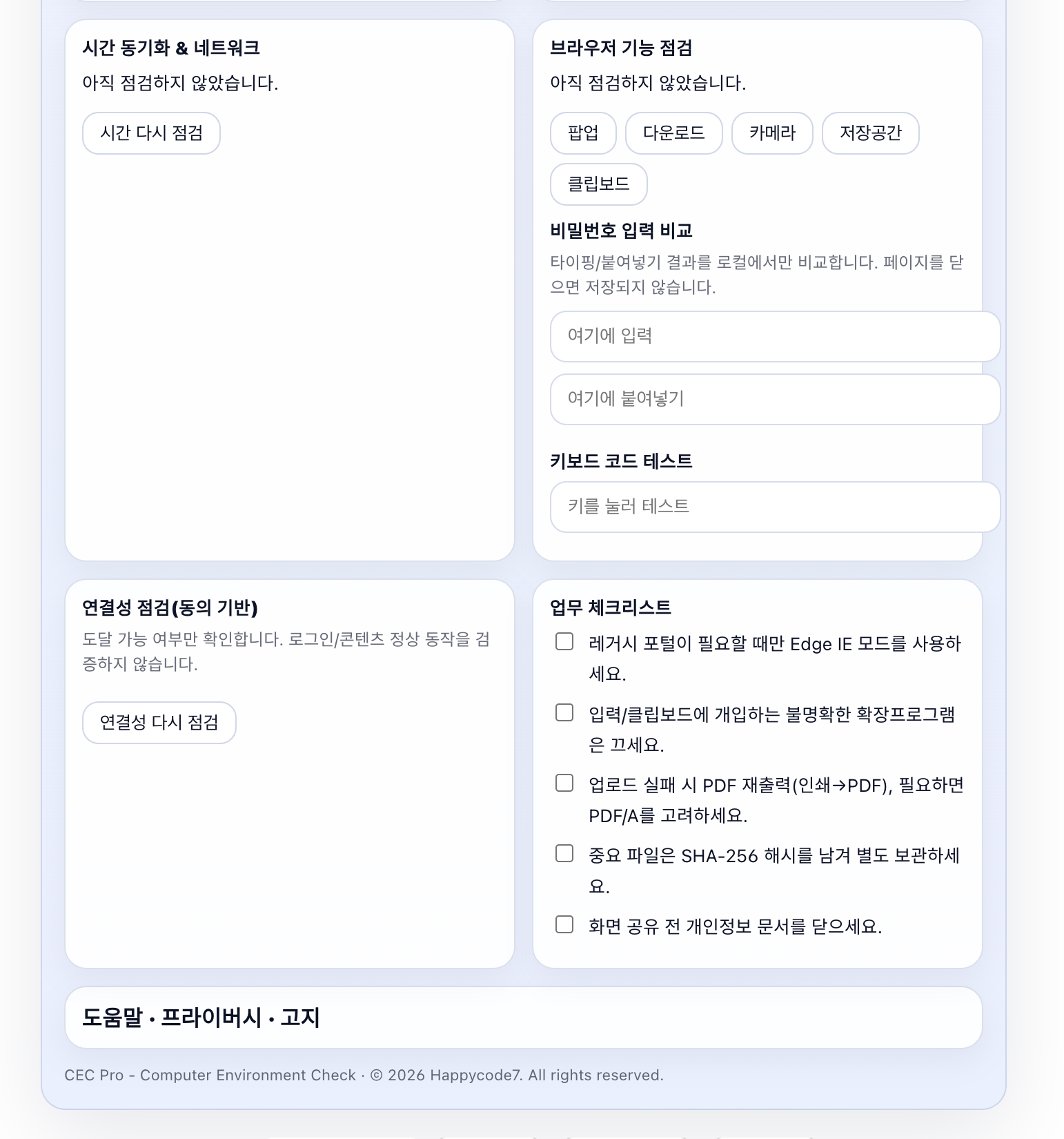
업무 사이트에 접속하려고 했는데 팝업이 열리지 않거나, 파일 다운로드가 막히거나, 카메라 권한이 작동하지 않거나, 붙여넣은 비밀번호가 예상과 다르게 입력되는 경우가 있습니다. 이런 문제는 컴퓨터 고장이라기보다 브라우저 설정, 권한 상태, 확장 프로그램, 네트워크 환경, 시스템 시간 차이에서 생기는 경우가 많습니다.
CEC Pro는 이런 상황에서 사용자가 직접 자신의 컴퓨터와 브라우저 환경을 확인해볼 수 있는 No-Upload Browser Environment Check Tool입니다. 별도 프로그램을 설치하지 않고 브라우저 안에서 실행되며, 사용자가 입력한 내용을 자동으로 업로드하지 않는 방식으로 사용할 수 있습니다.
이 도구는 현재 사용 중인 운영체제, 브라우저, 언어, 시간대, 입력 환경을 한눈에 확인할 수 있도록 도와줍니다. 또한 팝업 차단 여부, 다운로드 가능 여부, 카메라 권한, 저장공간 상태, 클립보드 권한, 키보드 입력 상태처럼 실제 업무 사이트 이용 중 문제가 될 수 있는 항목을 직접 점검할 수 있습니다.
온라인 행정 서비스, 세무·회계 업무, 법무 업무, 금융 관련 웹사이트, 병원·의료 행정 시스템, 회사 업무 포털, 원격 근무 환경을 사용하는 분들에게 특히 유용합니다. 중요한 제출이나 업무 처리 전에 브라우저 환경을 미리 확인하면, 단순 설정 문제 때문에 시간이 지연되는 상황을 줄이는 데 도움이 됩니다.
CEC Pro에는 Privacy Mode가 포함되어 있습니다. 이 모드를 켜면 외부 연결이 필요한 점검을 제한하고, 사용자의 브라우저 안에서 확인 가능한 항목 위주로 점검할 수 있습니다. 네트워크 관련 확인이 필요한 경우에도 자동으로 실행되는 것이 아니라 사용자가 직접 선택한 경우에만 진행되도록 구성되어 있습니다.
비밀번호 입력 비교 기능도 포함되어 있습니다. 직접 입력한 값과 붙여넣은 값이 같은지 브라우저 안에서 확인할 수 있어, 입력기, 보안 키보드, 브라우저 확장 프로그램, 자동완성 환경에서 문자가 다르게 처리되는지 참고용으로 점검할 수 있습니다. 단, 이 기능은 보안 사고 여부를 판단하는 기능이 아니라 입력 환경을 확인하기 위한 참고 기능입니다.
CEC Pro는 보안 프로그램이나 해킹 탐지 도구가 아닙니다. 대신 사용자가 자신의 업무 환경을 더 신중하게 확인할 수 있도록 돕는 privacy-first local browser check tool입니다. 중요한 업무를 하기 전, 사용 중인 브라우저와 기기 환경이 기본적으로 준비되어 있는지 확인하고 싶은 사용자에게 적합합니다.
보안과 프라이버시 안내
CEC Pro는 사용자의 입력을 불필요하게 외부로 보내지 않는 방향으로 설계된 브라우저 도구입니다. 사용자는 Privacy Mode를 통해 외부 연결이 필요한 항목을 제한할 수 있으며, 네트워크 관련 점검은 사용자가 직접 선택한 경우에만 진행됩니다.
이 도구는 사용자의 컴퓨터 환경을 과도하게 수집하거나 저장하기보다, 현재 브라우저에서 확인 가능한 기본 상태를 정리해 보여주는 데 초점을 둡니다. 업무용 기기, 공용 네트워크, 원격 근무 환경처럼 개인정보와 접속 환경을 신중하게 다뤄야 하는 상황에서도 참고용 점검 도구로 활용할 수 있습니다.
다만 어떤 브라우저 도구도 사용자의 전체 보안 상태를 완전히 보장할 수는 없습니다. 의심스러운 사이트, 오래된 브라우저, 알 수 없는 확장 프로그램, 공용 PC, 감염 가능성이 있는 기기에서는 사용을 주의해야 합니다. 중요한 계정이나 업무 시스템을 이용하기 전에는 운영체제와 브라우저를 최신 상태로 유지하고, 신뢰할 수 없는 확장 프로그램은 비활성화하는 것이 좋습니다.
면책조항
CEC Pro는 컴퓨터와 브라우저 환경을 참고용으로 확인하는 도구입니다. 결과는 기기, 브라우저, 권한 설정, 확장 프로그램, 네트워크 환경에 따라 달라질 수 있으며, 보안 진단·법률 검토·전문 IT 점검·컴플라이언스 검토를 대체하지 않습니다. 중요한 업무나 보안 판단은 반드시 전문 담당자에게 확인하시기 바랍니다.
CEC Pro No-Upload Browser Environment Check Tool
Sometimes, when you try to access a work-related website, pop-ups may not open, file downloads may be blocked, camera permissions may not work, or a pasted password may appear differently than expected. These issues are not always caused by a broken computer. In many cases, they can be related to browser settings, permission status, browser extensions, network conditions, or system time differences.
CEC Pro is a No-Upload Browser Environment Check Tool that allows users to check their own computer and browser environment in these situations. It runs directly inside the browser without requiring separate software installation, and it can be used in a way that does not automatically upload the user’s input.
This tool helps users review their current operating system, browser, language, time zone, and input environment at a glance. It also allows users to check practical items that may affect work-related websites, such as pop-up blocking, download availability, camera permission, storage status, clipboard permission, and keyboard input behavior.
CEC Pro can be especially useful for users who work with online government services, tax and accounting tasks, legal work, financial websites, healthcare administration systems, company work portals, or remote work environments. Before an important submission or work session, checking the browser environment in advance may help reduce delays caused by simple settings or permission issues.
CEC Pro includes Privacy Mode. When this mode is enabled, checks that require external connections can be limited, and users can focus on items that can be checked inside the browser. Network-related checks are not performed automatically; they are only carried out when the user chooses to run them.
The tool also includes a password input comparison feature. Users can compare a directly typed value with a pasted value inside the browser. This can be useful as a reference when checking whether an input method, security keyboard, browser extension, or autofill environment is affecting how characters are entered. However, this feature is not intended to determine whether a security incident has occurred. It is only a reference tool for checking the input environment.
CEC Pro is not a security program or a hacking detection tool. Instead, it is a privacy-first local browser check tool designed to help users review their work environment more carefully. It is suitable for users who want to check whether their browser and device environment is basically ready before performing important online work.
Security and Privacy Notice
CEC Pro is designed as a browser-based tool that avoids sending user input externally unless necessary. Users can use Privacy Mode to limit items that require external connections, and network-related checks are only performed when the user directly chooses to run them.
This tool focuses on organizing and displaying basic information that can be checked in the current browser, rather than excessively collecting or storing the user’s computer environment. It can be used as a reference check tool in situations where privacy and access environments should be handled carefully, such as work devices, public networks, and remote work environments.
However, no browser-based tool can fully guarantee the overall security status of a user’s device. Users should be cautious when using suspicious websites, outdated browsers, unknown extensions, public computers, or devices that may be infected. Before accessing important accounts or work systems, users are encouraged to keep their operating system and browser up to date and disable untrusted extensions.
Disclaimer
CEC Pro is a reference tool for checking computer and browser environments. Results may vary depending on the user’s device, browser, permission settings, extensions, and network environment. This tool does not replace professional security diagnosis, legal review, IT support, or compliance assessment. For important work-related or security-related decisions, users should consult a qualified professional or responsible administrator.
https://blog.naver.com/upttt_/224214569544
How to Add Web App to Your Home Screen
How to Add Web App to Your Home Screen For iPhone Open the website in Safari or Chrome o...
blog.naver.com
https://uplifestyle.tistory.com/558 2025. 8. 13.
컴터췍 – 전문직 사무용 PC 환경 점검 소프트웨어 | 전자소송·홈택스·정부24 호환 진단 + 직군별
컴터췍 – 전문직 사무용 PC 환경 점검 소프트웨어 전체 점검 보고서 복사 초기화 도움말 앱 설치 프라이버시 모드 외부 통신을 원천 차단합니다. 시간 서버 및 포털 핑도 실행하지 않습니다. 역
uplifestyle.tistory.com
#computerenvironmentcheck #browsercompatibilitytest #nouploadbrowsertool #privacyfirstbrowsercheck #workportalreadiness #securebrowserchecklist #remoteworksetupcheck #browserpermissiontest #clipboardpermissiontest #camerapermissiontest #popupblockertest #downloadtest #keyboardinputtest #passwordinputcomparison #localbrowsertool
#업무환경점검 #컴퓨터환경점검 #브라우저호환성테스트 #업로드없는도구 #프라이버시브라우저도구 #보안브라우저체크 #원격근무환경점검 #업무포털점검 #브라우저권한테스트 #클립보드권한테스트 #카메라권한테스트 #팝업차단테스트 #다운로드테스트 #키보드입력테스트 #비밀번호입력비교
#コンピューター環境チェック #ブラウザ互換性テスト #アップロード不要ツール #プライバシーブラウザツール #業務環境チェック #リモートワーク設定確認 #セキュアブラウザチェック #ブラウザ権限テスト #クリップボード権限テスト #カメラ権限テスト #ポップアップブロック確認 #ダウンロードテスト #キーボード入力テスト #パスワード入力比較
#电脑环境检查 #浏览器兼容性测试 #无需上传工具 #隐私优先浏览器工具 #办公环境检查 #远程办公环境检查 #安全浏览器检查 #浏览器权限测试 #剪贴板权限测试 #摄像头权限测试 #弹窗拦截测试 #下载测试 #键盘输入测试 #密码输入对比
#verificaciondelentornodelordenador #pruebadecompatibilidaddelnavegador #herramientasinarchivos #privacidaddelnavegador #revisiondelentornodetrabajo #trabajoremoto #checklistdenavegadorseguro #pruebadepermisosdelnavegador #pruebadeportapapeles #pruebadecamara #pruebadeventanasemergentes #pruebadedescarga #pruebadeteclado #comparaciondecontrasena


