Camera Measurement Tool in Browser – Estimate Distance, Length and Area Without Installing Apps
https://uplifestyle.tistory.com/832
MeasureDLA — Distance, Length, Area (Camera-based)
Measure (Camera) — Distance · Length · Area Estimate approximate distance, length, and area using a real-world reference object visible in the camera view. This is for practice and rough checks, not precision measurement. Local runs in-browser Privacy
uplifestyle.tistory.com
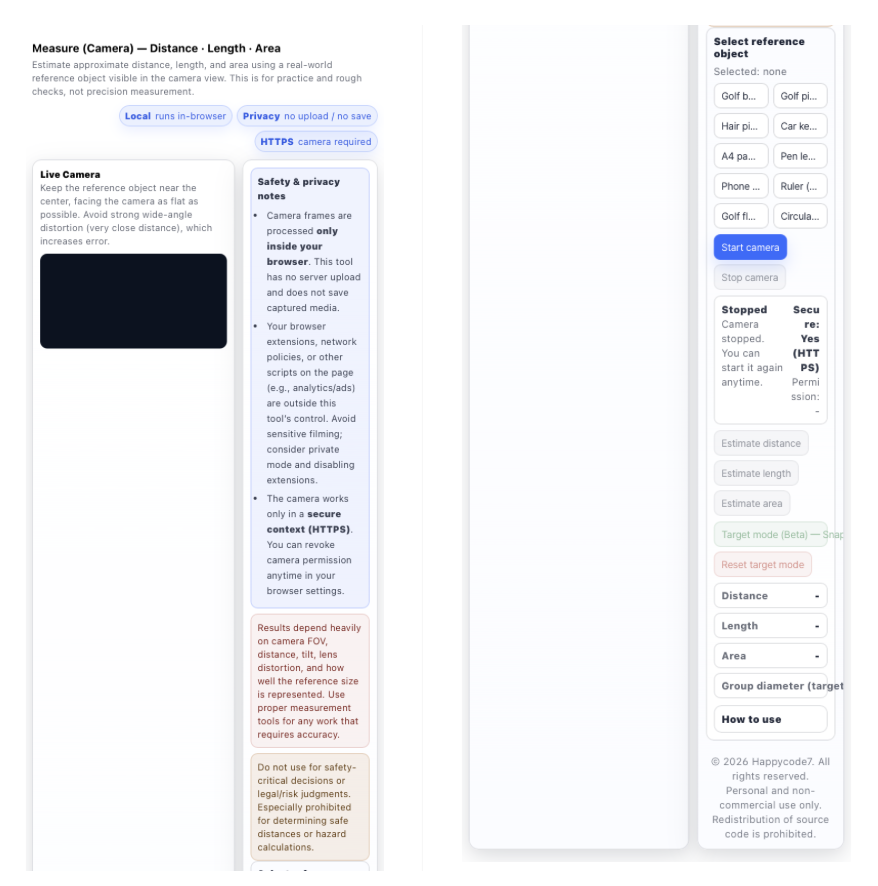
Camera measurement tools and browser-based AR measurement utilities are becoming increasingly popular among users searching for quick ways to estimate distance, length, or area without installing mobile applications.
This browser-based tool allows users to measure approximate spatial values using a device camera and a simple reference object such as a phone, pen, A4 paper, or other known item. Instead of relying on cloud processing or external AI services, the tool performs calculations directly inside the web browser, offering a fast and privacy-focused measurement experience.
Search trends for phrases like “measure distance with camera,” “online AR measurement tool,” “camera distance estimator,” and “web measurement calculator” have increased globally as users look for lightweight alternatives to mobile apps. This tool was designed to meet that demand by providing a simple, installation-free solution accessible from any modern browser.
Key Features
Camera-Based Distance Estimation
This tool allows users to estimate spatial measurements using a device camera and a real-world reference object placed within the camera frame.
By comparing the known physical size of the reference object with its visual size in the captured image, the system can generate approximate values for:
- distance between the camera and the object
- object length or dimension
- estimated surface area
This approach enables quick visual measurement without requiring specialized hardware or professional measuring equipment.
No Installation Required
The measurement system operates entirely inside the web browser.
Users can access the tool instantly without installing software or downloading mobile applications.
- No app installation
- No software download
- No user registration or account creation
As long as the device supports modern browser camera access (WebRTC), the tool can run directly from the webpage.
Privacy-First Architecture
The software is designed with a local-processing architecture to prioritize user privacy.
All camera frames are processed locally within the user's browser environment. The system does not upload, transmit, or store captured images.
Key privacy characteristics include:
- no image uploads to external servers
- no cloud-based processing
- no storage of captured media
This approach ensures that visual data remains entirely on the user's device during operation.
Target Mode (Snapshot Measurement)
The optional Target Mode introduces a snapshot-based measurement workflow designed for grouping analysis and reference calibration.
Users can:
- Capture a still frame from the live camera feed
- Perform calibration using a known reference diameter
- Mark multiple points within the image
The system then calculates the maximum distance between marked points to estimate group diameter or spread.
This feature can be particularly useful for:
- training or practice analysis
- visual grouping comparison
- experimental demonstrations
- educational measurement exercises
Typical Use Cases
Many international users search for tools like this when they need quick visual measurement capabilities without installing software.
Common scenarios include:
- rapid object size estimation
- camera-based measurement experiments
- browser-based AR measurement utilities
- quick distance estimation demonstrations
Because the tool operates entirely in the browser, it is compatible with most modern devices, including:
- smartphones
- tablets
- desktop computers
Users can access the functionality immediately through a supported web browser without installing additional applications.
Privacy & Security Design
The system follows a browser-local processing model to minimize external data exposure.
All camera frames are processed exclusively within the active browser session and are not transmitted to external servers or remote processing environments.
Users who require additional privacy safeguards may also operate the tool using:
- private browsing mode
- restricted network environments
- devices with limited external connectivity
This architecture helps maintain a privacy-conscious environment while allowing real-time visual estimation directly within the browser.
#cameraMeasurementTool #measureDistanceWithCamera #browserMeasurementTool #onlineDistanceEstimator #webBasedMeasuringTool #ARMeasurementTool #cameraLengthMeasurement #objectSizeEstimator #cameraDistanceCalculator #onlineMeasuringTool #cameraAreaMeasurement #visualMeasurementTool #browserARMeasurementTool #cameraRulerTool #privacyMeasurementTool #noInstallMeasurementTool #webCameraMeasurement #objectMeasurementCalculator #cameraMeasurementUtility #browserDistanceEstimator
camera measurement tool, online distance estimator, browser measurement tool, measure distance with camera, AR measurement online, camera ruler tool, web measuring tool, object size estimator, camera distance calculator, camera area measurement, browser AR tool, visual measurement software, web camera measurement, no install measurement tool, privacy measurement browser, online measurement utility, camera measurement calculator, web based measurement, object measurement online, camera distance estimator


