업로드 없는 브라우저 ZIP 압축·해제 도구 | Carrier ZIP — No-Upload Browser ZIP Compressor & Extractor
AI 기반 취약점 탐지·공격 자동화 이슈가 커지는 시점에서, Carrier ZIP은 파일을 외부 서버에 업로드하지 않고 브라우저 안에서 처리하는 구조를 갖고 있습니다. 이 방식은 업로드형 압축 도구를 사용할 때 발생할 수 있는 파일 전송, 외부 저장, 제3자 서버 노출 부담을 줄이는 데 도움이 됩니다.
출처 입력

업로드 없는 브라우저 ZIP 압축·해제 도구 | Carrier ZIP — No-Upload Browser ZIP Compressor & Extractor
https://uplifestyle.tistory.com/8382026. 2. 10.
Carrier ZIP — Browser-only ZIP Compressor & Extractor
Carrier ZIP — Browser-only ZIP Compressor & Extractor Works fully in your browser. No file uploads, no server transfer. Ideal for private documents, portfolios, and client assets. LANG English 한국어 日本語 中文 Español LOCAL ONLY Create ZIP fro
uplifestyle.tistory.com
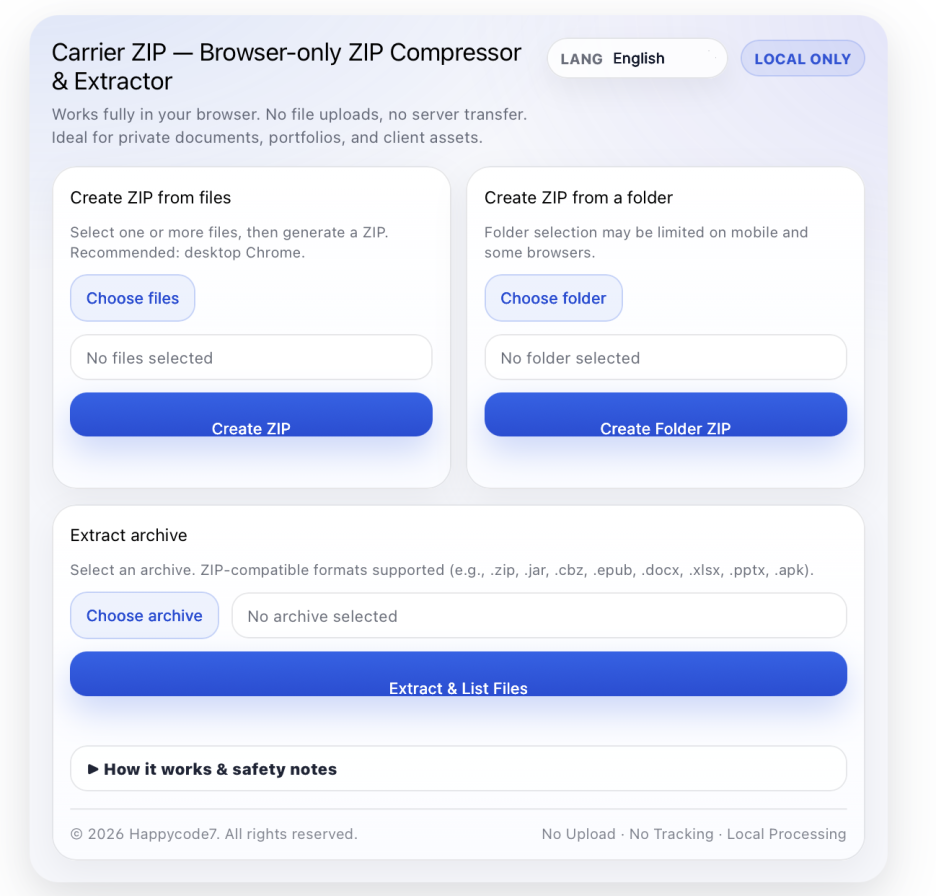
Carrier ZIP is a browser-based ZIP compressor and archive extractor designed for users who want a simple, private, and installation-free file utility. Instead of uploading files to a server, the tool works directly inside the browser, making it useful for people who handle private documents, portfolios, client assets, downloaded ZIP files, office files, e-book packages, and project folders.
Many international users search for practical terms such as ZIP compressor online, unzip files online, ZIP extractor, create ZIP file in browser, no upload ZIP tool, and private file compression tool. Carrier ZIP matches those needs by offering a clean workflow: select files, create a ZIP archive, choose a folder when supported, or open a ZIP-compatible archive and list the files inside.
The tool supports common ZIP-related workflows, including creating ZIP files from multiple files, creating a ZIP from a folder, and extracting/listing archive contents. The code also recognizes ZIP-compatible formats such as .zip, .jar, .cbz, .epub, .docx, .xlsx, .pptx, and .apk, which makes it useful for users who need to inspect packaged files without installing a heavy desktop app.
Carrier ZIP uses JSZip for browser-side ZIP generation and reading. JSZip documentation describes ZIP generation through generateAsync, and its ZIP loading API is designed for reading archive data in JavaScript. The downloaded result is handled through temporary Blob URLs, and MDN explains that Blob URLs represent in-memory resources and can be released with URL.revokeObjectURL() when no longer needed.
This makes Carrier ZIP especially suitable for creators, students, freelancers, office workers, sellers, designers, and developers who often need to compress project files, organize attachments, open downloaded archives, check document packages, or prepare files for sharing. It is not a cloud storage service and does not replace professional forensic, backup, or enterprise archive software, but it provides a fast and privacy-focused option for everyday ZIP tasks.
Because processing depends on the user’s own browser and device memory, very large files may fail depending on RAM, browser limits, or mobile restrictions. Folder selection can also be limited on some browsers or mobile devices. For important files, users should always keep original backups before compressing or extracting archives.
Security Strengths
Carrier ZIP processes ZIP compression and archive checking directly inside the user’s browser without uploading files to a server. This can be helpful when working with private documents, office files, portfolios, client assets, or project folders that users may not want to send online.
It also works without installation or login, reducing unnecessary exposure from account creation, software downloads, or third-party upload workflows.
Security Strength — in relation to recent AI security concerns
As AI-assisted vulnerability discovery and automated attack techniques receive more attention, Carrier ZIP is designed to process ZIP creation and archive reading inside the user’s browser, without uploading selected files to an external server.
This browser-side structure can reduce risks commonly associated with upload-based file tools, such as unnecessary file transmission, third-party server storage, external data exposure, or fake online ZIP extractor websites that ask users to upload sensitive files.
Carrier ZIP does not claim to prevent all AI-related threats, malware, or unknown archive risks. However, for everyday file compression and archive inspection, its no-upload, local browser processing approach provides a more privacy-conscious workflow for users handling private documents, office files, client assets, portfolios, or project folders.
User Safety Notes
Please keep original backups before working with important files. On shared or public computers, users should check and clear downloaded files, browser history, temporary files, and clipboard contents after use.
Carrier ZIP은 간단하고, 비공개로 사용할 수 있으며, 설치가 필요 없는 파일 유틸리티를 원하는 사용자를 위한 브라우저 기반 ZIP 압축 및 압축파일 확인 도구입니다. 파일을 서버에 업로드하는 방식이 아니라 사용자의 브라우저 안에서 직접 처리되기 때문에, 개인 문서, 포트폴리오, 클라이언트 자료, 다운로드한 ZIP 파일, 오피스 문서, 전자책 패키지, 프로젝트 폴더 등을 다루는 사람들에게 유용합니다.
많은 해외 사용자들은 ZIP compressor online, unzip files online, ZIP extractor, create ZIP file in browser, no upload ZIP tool, private file compression tool*같은 실용적인 검색어로 도구를 찾습니다. Carrier ZIP은 이러한 검색 의도에 맞춰, 파일을 선택하고 ZIP 아카이브를 만들거나, 지원되는 환경에서는 폴더를 선택해 ZIP으로 묶고, ZIP 호환 아카이브를 열어 내부 파일 목록을 확인할 수 있는 깔끔한 작업 흐름을 제공합니다.
이 도구는 여러 파일을 하나의 ZIP 파일로 만들기, 폴더를 ZIP으로 압축하기, 압축파일 내부 내용을 추출하거나 목록으로 확인하기 같은 일반적인 ZIP 작업을 지원합니다. 또한 .zip, .jar, .cbz, .epub, .docx, .xlsx, .pptx, .apk 같은 ZIP 기반 형식도 인식할 수 있어, 무거운 데스크톱 프로그램을 설치하지 않고도 패키지 구조를 간단히 확인해야 하는 사용자에게 도움이 됩니다.
Carrier ZIP은 브라우저 안에서 ZIP 생성과 읽기를 처리하기 위해 JSZip을 사용합니다. JSZip은 JavaScript 환경에서 ZIP 파일을 생성하고 읽을 수 있도록 설계된 라이브러리이며, 생성된 다운로드 파일은 임시 Blob URL을 통해 처리됩니다. Blob URL은 브라우저 메모리 안의 리소스를 가리키는 방식이며, 더 이상 필요하지 않을 때 해제할 수 있습니다.
이러한 구조 덕분에 Carrier ZIP은 크리에이터, 학생, 프리랜서, 사무직 사용자, 온라인 셀러, 디자이너, 개발자처럼 프로젝트 파일을 압축하거나, 첨부파일을 정리하거나, 다운로드한 압축파일을 열어보거나, 문서 패키지를 확인하거나, 공유용 파일을 준비해야 하는 사람들에게 특히 적합합니다.
다만 Carrier ZIP은 클라우드 저장 서비스가 아니며, 전문 포렌식 도구, 백업 솔루션, 기업용 아카이브 소프트웨어를 대체하지 않습니다. 대신 일상적인 ZIP 작업을 빠르고 간단하게 처리할 수 있는 개인정보 보호 중심의 브라우저 도구에 가깝습니다.
처리는 사용자의 브라우저와 기기 메모리에 의존하기 때문에, 매우 큰 파일은 RAM, 브라우저 제한, 모바일 환경의 제약에 따라 실패할 수 있습니다. 또한 폴더 선택 기능은 일부 브라우저나 모바일 기기에서 제한될 수 있습니다. 중요한 파일을 압축하거나 압축 해제하기 전에는 반드시 원본 백업을 보관하는 것이 좋습니다.
보안 강점
Carrier ZIP은 파일을 서버에 업로드하지 않고 사용자의 브라우저 안에서 직접 ZIP 압축과 아카이브 확인을 처리합니다. 개인 문서, 업무 파일, 포트폴리오, 클라이언트 자료, 프로젝트 폴더처럼 외부 전송이 부담되는 파일을 다룰 때 유용합니다.
또한 설치나 로그인 없이 사용할 수 있어, 계정 생성, 프로그램 다운로드, 외부 업로드 과정에서 생길 수 있는 불필요한 개인정보 노출 부담을 줄일 수 있습니다.
보안 강점 — 최근 AI 보안 이슈와 관련하여
최근 AI 기반 취약점 탐지, 공격 자동화, 가짜 온라인 도구를 통한 파일 유도 위험이 주목받는 상황에서, Carrier ZIP은 선택한 파일을 외부 서버에 업로드하지 않고 사용자의 브라우저 안에서 ZIP 생성과 아카이브 확인을 처리합니다.
이러한 브라우저 내부 처리 구조는 업로드형 파일 도구를 사용할 때 발생할 수 있는 불필요한 파일 전송, 제3자 서버 저장, 외부 데이터 노출, 민감한 파일 업로드 유도 위험을 줄이는 데 도움이 됩니다.
Carrier ZIP이 모든 AI 관련 위협, 악성 파일, 알 수 없는 압축파일 위험을 차단한다고 주장하는 것은 아닙니다. 다만 일상적인 파일 압축과 아카이브 확인 작업에서는 노업로드·로컬 브라우저 처리 방식을 통해 개인 문서, 업무 파일, 클라이언트 자료, 포트폴리오, 프로젝트 폴더를 보다 개인정보 보호 중심의 흐름으로 다룰 수 있습니다.
사용자 주의사항
중요한 파일은 작업 전 반드시 원본을 백업해 주세요. 공용 PC나 공유 기기에서는 작업 후 다운로드 파일, 브라우저 기록, 임시 파일, 클립보드 내용을 확인하고 정리하는 것이 좋습니다.
https://uplifestyle.tistory.com/5422025. 8. 1.
캐리어 | PC Chrome / Mobile ZIP 압축 웹앱
캐리어 | PC Chrome / Mobile ZIP 압축 웹앱 파일/폴더 압축 만들기 파일 압축 압축 파일 만들기 폴더 압축 폴더 압축 파일 만들기 압축 해제 압축 해제 사용 방법 파일 압축: 개별 파일 선택 → ‘압축
uplifestyle.tistory.com
https://blog.naver.com/upttt_/224214569544
How to Add Web App to Your Home Screen
How to Add Web App to Your Home Screen For iPhone Open the website in Safari or Chrome o...
blog.naver.com
#ZIPCompressor #ZIPExtractor #OnlineZIPTool #NoUploadZIPTool #PrivateFileCompression #BrowserZIPTool #CreateZIPFile #UnzipFilesOnline #ArchiveViewer #LocalFileProcessing #NoInstallTool #PrivacyFocusedTool #DocumentPackageViewer #OfficeFileCompression #ProjectFolderZIP
#ZIP압축 #ZIP압축해제 #온라인ZIP도구 #노업로드ZIP #브라우저ZIP도구 #설치없는압축도구 #개인정보보호도구 #로컬파일처리 #압축파일확인 #파일압축도구 #문서패키지확인 #오피스파일압축 #프로젝트폴더압축 #파일정리도구 #보안파일도구
#ZIP圧縮 #ZIP解凍 #オンラインZIPツール #アップロード不要 #ブラウザZIPツール #インストール不要 #プライバシー重視 #ローカルファイル処理 #アーカイブ確認 #ファイル圧縮ツール #文書パッケージ確認 #オフィスファイル圧縮 #プロジェクトフォルダ圧縮 #ファイル整理 #安全なファイルツール
#ZIP压缩 #ZIP解压 #在线ZIP工具 #无需上传 #浏览器ZIP工具 #无需安装 #隐私保护工具 #本地文件处理 #压缩包查看 #文件压缩工具 #文档包查看 #办公文件压缩 #项目文件夹压缩 #文件整理工具 #安全文件工具
#CompresorZIP #ExtractorZIP #HerramientaZIPOnline #SinSubirArchivos #ZIPenNavegador #SinInstalación #HerramientaPrivada #ProcesamientoLocal #VisorDeArchivosComprimidos #CompresiónDeArchivos #VisorDePaquetesDeDocumentos #CompresiónDeOficina #CarpetaDeProyectoZIP #OrganizadorDeArchivos #HerramientaSeguraDeArchivos


