러닝·자전거 GPS 운동기록 도구|StrideBuddy Pro Running & Cycling GPS Workout Tracker
보안 강점 간단요약
No Upload 구조
이미지·텍스트·파일을 외부 서버로 보내지 않으면, 업로드 과정에서 정보가 새는 위험이 줄어듭니다.
브라우저 내부 처리
사용자 기기 안에서만 계산·변환·분석하면 서버 침해, 외부 저장소 노출 위험이 낮아집니다.
로그인 없음
회원가입·로그인·비밀번호 입력이 없으면 계정 탈취나 가짜 로그인 피싱 위험을 줄일 수 있습니다.
외부 요청 최소화
외부 API, 추적 스크립트, 알 수 없는 CDN을 안 쓰면 악성 스크립트 주입이나 데이터 전송 가능성이 줄어듭니다.
민감정보 저장 안 함
localStorage/cookie/server DB에 민감정보를 저장하지 않으면 나중에 기록이 털릴 위험이 낮습니다.
단일 페이지 도구 구조
복잡한 서버 권한이나 관리자 페이지가 없어서 공격 표면이 작습니다.
“이 도구는 사용자의 입력값을 외부 서버로 업로드하지 않고 브라우저 안에서 처리하도록 설계되어, 피싱·가짜 업로드·외부 저장소 노출 같은 보안 불안을 줄이는 데 도움이 됩니다.”

https://uplifestyle.tistory.com/8372026. 2. 10.
StrideBuddy
StrideBuddy global Train smarter with one phone — estimate running cadence, distance, and bike speed using on-device sensors and GPS. Language English 한국어 日本語 中文 Español Permission Waiting ..
uplifestyle.tistory.com
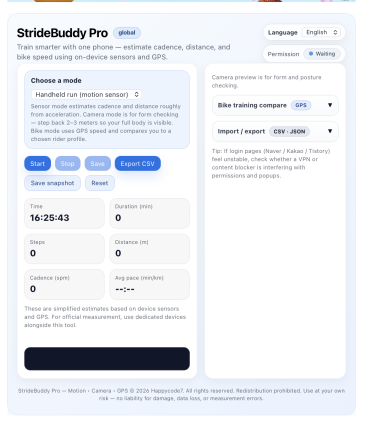
Spring and summer are the seasons when many people start searching for practical ways to track outdoor running, cycling, walking workouts, bike training, running cadence, GPS speed, workout logs, pace, distance, and mobile fitness tracking. StrideBuddy Pro is designed for users who want a simple browser-based training tool without installing a heavy app or creating an account.
StrideBuddy Pro helps runners, cyclists, and everyday fitness users check basic workout data directly from a smartphone browser. The tool includes three practical modes: a handheld running mode that uses motion sensor input to estimate steps, distance, cadence, and average pace; a camera mode for checking running form or full-body posture; and a bike training mode that uses GPS speed to compare the current ride against selected rider profiles.
For international users, this kind of tool is useful when they are searching for a quick running tracker, bike speed tracker, GPS workout tracker, cadence counter, cycling training helper, phone-based fitness tool, or outdoor exercise log. Instead of focusing on complicated dashboards, StrideBuddy Pro keeps the workflow direct: start tracking, view key numbers, save a session, and export the result.
The running mode is suitable for users who want a rough cadence and distance estimate while holding or mounting a phone. The bike mode is useful for checking current GPS speed in km/h and comparing it with a simple target profile such as elite road, U23 road, track sprinter, or amateur endurance. The camera mode is not an AI diagnosis system; it is a visual preview tool that helps users check posture, body position, and movement form from a full-body view.
StrideBuddy Pro also supports CSV export and JSON backup/import, which makes it helpful for users who want to keep personal workout records, compare sessions, or move logs between devices and browsers. For creators, personal trainers, cycling hobbyists, runners, students, and casual fitness users, this makes the software easy to use as a lightweight training log.
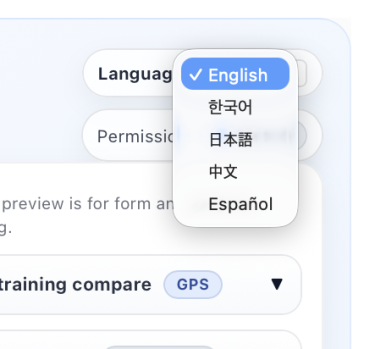
Another strength is multilingual accessibility. The interface supports English, Korean, Japanese, Chinese, and Spanish, so global users can understand the main controls, permission messages, warnings, bike mode guidance, and export options in familiar languages. This is useful for search visitors looking for a multilingual running tracker, multilingual cycling tracker, mobile GPS fitness tool, or browser workout log.
StrideBuddy Pro is best understood as a practical companion tool, not a replacement for a professional sports watch, certified timing device, medical device, power meter, or official race measurement system. Sensor and GPS results can vary depending on browser support, phone model, GPS signal, camera permission, device placement, movement pattern, lighting, and outdoor conditions. For official training analysis, medical decisions, injury prevention, or competition records, users should compare results with dedicated equipment and professional guidance.
For users who simply want to open a browser and check running cadence, estimated distance, bike speed, pace, workout duration, and exportable training records, StrideBuddy Pro provides a clean and accessible way to start.
User Guidelines
StrideBuddy Pro is a browser-based fitness support tool that helps users check basic running, walking, and cycling records from a smartphone browser. Please read the following guidelines before using the tool.
1. Permission Notice
Depending on the selected mode, this tool may use motion sensor, camera, and GPS location permissions.
Running mode uses phone movement to estimate steps, distance, cadence, and pace.
Camera mode provides a visual preview for checking full-body posture and movement.
Bike mode uses GPS to display reference speed, distance, and related cycling data.
These permissions work through your browser, and you must choose whether to allow them. You may deny permissions if you do not want to use those features.
2. Privacy Notice
When using camera mode, make sure that other people, private rooms, vehicle plates, personal documents, address information, or sensitive backgrounds are not visible on screen.
GPS mode may involve current location and movement-related information. For better privacy, avoid using GPS mode on shared devices, work devices, school devices, or someone else’s phone.
Workout records can be exported as CSV or JSON files. These files may include workout time, mode, distance, speed, pace, and other session information. Please review the file before sharing it with others or uploading it to cloud storage.
3. Shared Device Caution
Use extra caution on public computers, shared browsers, company devices, school devices, or borrowed phones.
After using this tool on a shared device, it is recommended to reset records, delete downloaded files, clear browser data, and review camera/location permissions.
4. Measurement Notice
All values shown in StrideBuddy Pro are simplified reference estimates. Results may vary depending on device model, browser support, GPS signal, phone placement, movement style, lighting, and outdoor conditions.
For official workout records, race timing, medical decisions, injury-related decisions, or professional training analysis, use dedicated equipment and consult qualified professionals when necessary.
5. Safety Notice
Do not continuously look at or operate the screen while moving. This may increase the risk of accidents.
For cycling, do not operate the tool while riding. Stop in a safe place before checking the screen or changing settings.
Secure your phone properly before running, walking, or cycling. Always pay attention to pedestrians, vehicles, road conditions, and your surroundings.
6. Recommended Use Environment
Use this tool on your own personal smartphone or private browser whenever possible.
GPS features may work more reliably outdoors than indoors.
Camera mode works best with enough light and enough distance for your full body to appear on screen.
If camera or location access is blocked, check your browser permission settings and try again.
7. Short Notice
StrideBuddy Pro is a browser-based fitness tracking support tool. It may use camera, motion sensor, and GPS permissions depending on the selected mode. All measurements are reference estimates only. Use it on a personal device when possible, delete records and downloaded files after using a shared device, and do not operate the screen while cycling or moving.
Disclaimer
StrideBuddy Pro is provided for general fitness reference and personal record-keeping only. It is not a medical device, professional coaching service, certified measurement system, emergency safety tool, or official race timing solution. All sensor, camera, GPS, cadence, pace, distance, speed, and estimated power outputs are simplified estimates and may be inaccurate depending on device, browser, permissions, GPS signal, camera conditions, movement pattern, and user environment. Users are responsible for safe use, local law compliance, road safety, device mounting, privacy permissions, and personal health decisions. Do not use this tool while cycling, running, or moving in a way that distracts from traffic, pedestrians, or surrounding hazards. The developer is not liable for injury, accident, data loss, measurement error, training decisions, business loss, legal dispute, or any direct or indirect damages arising from use of this software.
StrideBuddy Pro는 running tracker, cycling tracker, GPS workout tracker를 찾는 해외 사용자와 한국 사용자 모두에게 맞춘 브라우저 기반 운동 기록 도구입니다. 별도 앱 설치 없이 스마트폰 브라우저에서 러닝, 걷기, 자전거 훈련 기록을 간단히 확인할 수 있도록 설계되었습니다.
이 도구는 motion sensor 기반 handheld run mode, camera form check mode, bike training / GPS mode를 제공합니다. 러닝 모드에서는 걸음 수, 예상 거리, cadence, average pac를 확인할 수 있고, 자전거 모드에서는 GPS speed를 기준으로 bike speed, target speed, estimated power를 참고할 수 있습니다. 카메라 모드는 전신이 보이도록 두고 running form, posture check, body position을 눈으로 확인하는 용도입니다.
요즘 해외 사용자들은 mobile fitness tracker, browser fitness app, running cadence tracker, bike speed tracker, outdoor workout log, GPS bike training tool같은 검색어로 가볍고 빠른 운동 보조 도구를 찾는 경우가 많습니다. StrideBuddy Pro는 복잡한 회원가입이나 무거운 앱 설치보다, 바로 열고 바로 기록하는 simple workout tracking experience에 초점을 둔 소프트웨어입니다.
또한 CSV export와 JSON backup / import 기능을 지원해 개인 운동기록을 저장하거나 다른 브라우저·기기에서 기록을 이어갈 수 있습니다. running pace, distance, cadence, cycling speed, workout duration처럼 기본적인 fitness data를 정리하고 싶은 사용자에게 실용적인 선택지가 될 수 있습니다.
StrideBuddy Pro는 English, 한국어, 日本語, 中文, Español UI를 지원합니다. 그래서 global users가 자신의 언어로 start, stop, save, export, permission, GPS guide, camera permission message를 이해하기 쉽습니다. 다국어 운동 도구, multilingual fitness tracker, no-install workout tracker를 찾는 사용자에게 자연스럽게 맞는 구조입니다.
다만 이 도구는 professional sports watch, medical device, certified race timing system, power meter를 대체하지 않습니다. 모든 수치는 device sensor, browser support, GPS signal, camera permission, phone placement, outdoor condition에 따라 달라질 수 있는 simplified estimate입니다. 공식 기록, 의료 판단, 전문 훈련 분석에는 전용 장비와 전문가의 확인을 함께 사용하는 것이 좋습니다.
1. 권한 사용 안내
이 도구는 기능에 따라 모션 센서, 카메라, GPS 위치 권한을 사용할 수 있습니다.
러닝 모드는 휴대폰의 움직임을 바탕으로 걸음 수, 거리, 케이던스 등을 추정합니다.
카메라 모드는 전신 자세와 움직임을 눈으로 확인하기 위한 미리보기 기능입니다.
자전거 모드는 GPS를 사용해 현재 속도와 이동 거리 등을 참고용으로 표시합니다.
권한은 브라우저에서 사용자가 직접 허용해야 작동합니다. 원하지 않는 경우 권한을 허용하지 않아도 됩니다.
2. 개인정보 보호 안내
카메라 모드를 사용할 때는 주변 사람, 집 내부, 차량 번호판, 개인 문서, 위치가 드러나는 배경 등이 화면에 들어가지 않도록 주의해 주세요.
GPS 기능은 현재 위치와 이동 흐름이 포함될 수 있으므로, 공용 기기나 타인의 휴대폰에서는 사용을 권장하지 않습니다.
운동 기록은 CSV 또는 JSON 파일로 저장할 수 있습니다. 저장한 파일에는 운동 시간, 모드, 거리, 속도, 페이스 등의 정보가 포함될 수 있으므로 다른 사람에게 공유하거나 클라우드에 업로드하기 전 내용을 확인해 주세요.
3. 공용 기기 사용 주의
공용 PC, 회사 기기, 학교 기기, 타인의 휴대폰에서는 사용을 주의해 주세요.
공용 기기에서 사용한 경우에는 사용 후 기록 초기화, 다운로드 파일 삭제, 브라우저 데이터 삭제, 카메라·위치 권한 해제를 확인하는 것이 좋습니다.
4. 측정값 안내
StrideBuddy Pro의 모든 수치는 모바일 센서, 브라우저, GPS 신호, 기기 고정 상태, 움직임 방식, 주변 환경에 따라 달라질 수 있는 참고용 추정값입니다.
정확한 운동 기록, 공식 경기 기록, 의료 판단, 전문 훈련 분석에는 전용 장비나 전문가의 확인을 함께 사용해 주세요.
5. 안전 사용 안내
운동 중 화면을 계속 보거나 조작하면 사고 위험이 있을 수 있습니다. 특히 자전거 이용 중에는 주행 중 조작하지 말고, 안전한 장소에 멈춘 뒤 확인해 주세요.
휴대폰은 손에서 떨어지지 않도록 단단히 고정하고, 야외에서는 주변 보행자, 차량, 도로 상황을 먼저 확인해 주세요.
6. 권장 사용 환경
개인 스마트폰 또는 개인 브라우저에서 사용하는 것을 권장합니다.
GPS 기능은 실내보다 야외에서 더 안정적으로 작동할 수 있습니다.
카메라 모드는 충분한 밝기와 전신이 보이는 거리에서 사용하는 것이 좋습니다.
브라우저 권한이 차단된 경우, 브라우저 설정에서 카메라 또는 위치 권한을 다시 확인해 주세요.
7. 짧은 안내문
StrideBuddy Pro는 브라우저 기반 운동 기록 보조 도구입니다. 카메라, 모션 센서, GPS 권한을 사용할 수 있으며, 모든 측정값은 참고용 추정값입니다. 개인 기기에서 사용하는 것을 권장하며, 공용 기기에서는 사용 후 기록과 다운로드 파일을 삭제해 주세요. 운동 중에는 안전을 우선하고, 자전거 주행 중에는 화면을 조작하지 마세요.
면책조항
StrideBuddy Pro는 일반 운동 기록과 참고용 fitness tracking tool입니다. 센서·GPS·카메라 기반 수치는 기기, 브라우저, 권한, GPS 환경, 사용 방식에 따라 달라질 수 있으며, 의료기기·공식 측정장비·전문 코칭 서비스를 대체하지 않습니다. 사용자는 안전한 환경에서 본인 책임하에 이용해야 합니다.
https://uplifestyle.tistory.com/540 2025. 8. 1.
폴짝폴짝 - Happycode7
폴짝폴짝 – 모바일 운동 측정 (센서/카메라/GPS) 폴짝폴짝 mobile 휴대폰 한 대로 러닝, 점프, 자전거 선수 훈련을 측정하는 도구입니다. 사용 모드 선택 손에 들고 뛰기 (센서 기반) 카메라 기반 (
uplifestyle.tistory.com
https://blog.naver.com/upttt_/224214569544
How to Add Web App to Your Home Screen
How to Add Web App to Your Home Screen For iPhone Open the website in Safari or Chrome o...
blog.naver.com
#러닝트래커 #runningtracker #자전거트래커 #cyclingtracker #GPS운동기록 #GPSworkouttracker #러닝케이던스 #runningcadence #자전거속도측정 #bikespeedtracker #모바일피트니스 #mobilefitnesstracker #브라우저운동도구 #browserfitnessapp #운동기록 #workoutlog #야외운동기록 #outdoorworkout #카메라자세체크 #cameraformcheck #CSV운동기록 #CSVworkoutlog #설치없는운동도구 #noinstallfitness #다국어운동도구 #multilingualfitness #StrideBuddyPro#러닝트래커 #자전거트래커 #GPS운동기록 #러닝케이던스 #자전거속도측정 #모바일피트니스 #브라우저운동도구 #카메라자세체크 #운동기록 #야외운동기록 #설치없는운동도구 #ランニングトラッカー #サイクリングトラッカー #GPSワークアウト #ランニングケイデンス #自転車速度計 #モバイルフィットネス #ブラウザ運動記録 #カメラフォームチェック #運動記録 #屋外トレーニング #インストール不要 #跑步记录器 #骑行记录器 #GPS运动记录 #跑步步频 #自行车速度追踪 #手机健身工具 #浏览器运动记录 #相机姿态检查 #运动记录 #户外运动记录 #无需安装健身工具
#rastreadorderunning #rastreadordeciclismo #GPSentrenamiento #cadenciadecarrera #velocidadenbici #appfitnessmovil #herramientafitness #revisiondepostura #registrodeentrenamiento #entrenamientoalairelibre #fitnesssininstalacion
#runningtracker #cyclingtracker #GPSworkouttracker #runningcadence #bikespeedtracker #mobilefitnesstracker #browserfitnessapp #cameraformcheck #workoutlog #outdoorworkout #noinstallfitness #StrideBuddyPro #티스토리 #Tistory #로컬처리 #NoUpload #서버리스 #브라우저보안 #개인정보보호 #보안도구 #피싱예방 #사이버보안 #정보보안 #SecurityTool #PrivacyFirst #LocalProcessing #BrowserTool #OfflineTool #NoServer #SafeBrowser #AntiPhishing #CyberSecurity #DataPrivacy #HTTPS #웹보안 #보안인식 #미토스 #MITOS #티스토리코드 #웹앱 #HTMLTool #JavaScript #ClientSide #SecureTool #로컬웹앱 #무료도구 #BrowserSecurity #Serverless #PrivacyTool
티스토리, Tistory, 로컬처리, NoUpload, 서버리스, 브라우저보안, 개인정보보호, 보안도구, 피싱예방, 사이버보안, 정보보안, SecurityTool, PrivacyFirst, LocalProcessing, BrowserTool, OfflineTool, NoServer, SafeBrowser, AntiPhishing, CyberSecurity, DataPrivacy, HTTPS, 웹보안, 보안인식, 미토스, MITOS, 티스토리코드, 웹앱, HTMLTool, JavaScript, ClientSide, SecureTool, 로컬웹앱, 무료도구, BrowserSecurity, Serverless, PrivacyTool


