이 도구는 사용자가 선택한 이미지를 서버로 업로드하지 않고, 브라우저 안에서 바로 분석하는 로컬 처리 방식입니다.
따라서 제품 사진, 표면 스크래치 이미지, 검사 참고 이미지를 외부 서버로 보내지 않고 확인할 수 있어 개인정보와 파일 노출 위험을 줄이는 데 도움이 됩니다.
결과는 화면에서 확인하거나 PDF 리포트로 저장할 수 있으며, 사용 후에는 공용 PC에서 파일과 다운로드한 리포트를 꼭 정리하는 것이 좋습니다.
민감한 정보가 보이는 사진은 사용 전 가리거나 잘라낸 뒤 업로드하는 것을 권장합니다.
이 도구의 분석 결과는 참고용이므로 실제 품질 판정, 보상, 거래 분쟁에는 공식 검사나 전문가 확인과 함께 사용하는 것이 안전합니다.
서버 업로드 없는 브라우저 기반 AI 표면 결함검사 | Local Defect Detection Tool
https://uplifestyle.tistory.com/834
AI Defect Detection & Location Report
AI Scratch / Defect Detection & Location Report Upload an image, choose a profile and sensitivity, then generate a defect map and a PDF report. This runs locally in your browser and only analyzes the file you select. Browser-based • Local analysis Inspec
uplifestyle.tistory.com
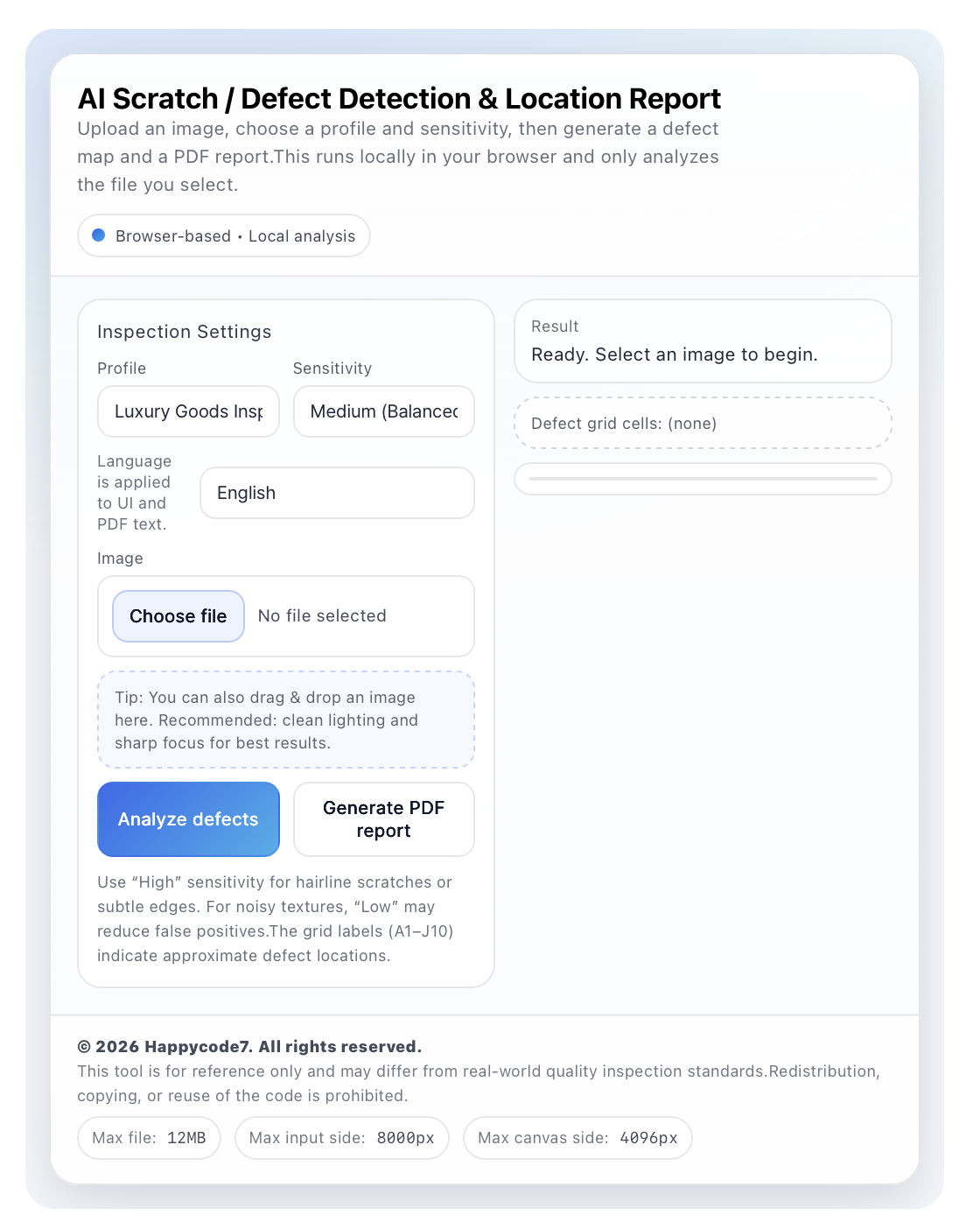
When checking product photos or surface-condition images, users often need two things at the same time: a clear inspection record and a safer way to handle image files. Local Defect Detection Tool is a browser-based AI surface defect inspection tool designed to help users review scratches, surface anomalies, and suspected defect areas directly from an image.
The tool works without heavy software installation. After selecting an image, users can choose an inspection profile such as luxury goods inspection, film installation surface check, or manufacturing QA visual check. They can also adjust the sensitivity level depending on whether they want fewer detections, a balanced review, or more detailed detection for subtle scratches and fine surface edges.
Its strongest advantage is the no-upload local analysis structure. Instead of sending the selected image to an external server, the image is processed inside the browser. This can reduce the risks commonly associated with upload-based services, such as unnecessary file transfer, server-side storage exposure, and dependency on external analysis environments. For users handling private product photos, internal QA samples, client reference images, resale item photos, or film installation records, this local-first workflow provides a more privacy-conscious inspection experience.
The analysis result highlights suspected defect areas on the image and organizes approximate locations using an A1–J10 grid. This makes it easier to describe where a defect appears instead of relying on vague notes such as “near the center” or “on the lower right side.” The built-in PDF report function also helps users keep a simple inspection record for internal review, product condition notes, surface check documentation, or quality-control reference materials.
For international users searching for AI defect detection, surface inspection tool, scratch detection, visual inspection software, manufacturing QA, product condition report, or PDF inspection report, this tool offers a lightweight way to perform a reference-level visual check before using more complex inspection equipment or professional software.
From a security perspective, the tool includes practical safeguards such as image file validation, file-size limits, input-resolution limits, browser canvas-based processing, and controlled result text handling. These design choices help reduce unnecessary file exposure and make the tool suitable for users who prefer to inspect images without uploading them to a remote service.
This software is recommended for quick surface review, early defect screening, luxury item condition checks, film installation records, manufacturing QA references, resale product photo review, and simple PDF-based documentation. However, it is important to understand that this is a reference-level inspection assistant, not an official quality-certification system.
Disclaimer
This tool is provided for reference-level visual inspection only. The results may vary depending on image quality, lighting, focus, camera angle, surface texture, compression, file resolution, and sensitivity settings. Detected areas are approximate and may include false positives or missed defects.
This software does not replace professional inspection, certified quality control, official manufacturing standards, warranty evaluation, refund decisions, insurance review, legal evidence assessment, safety certification, or regulated industrial inspection. Users are responsible for reviewing the results carefully and verifying important findings with qualified professionals, approved inspection equipment, or official quality-control procedures.
서버 업로드 없는 브라우저 기반 AI 표면 결함검사 | Local Defect Detection Tool
제품 사진이나 표면 상태 이미지를 확인할 때는 결함 의심 위치를 명확하게 기록하는 것만큼, 이미지 파일을 안전하게 다루는 방식도 중요합니다. Local Defect Detection Tool은 사용자가 선택한 이미지를 기준으로 스크래치, 표면 이상, 결함 의심 영역을 브라우저 안에서 빠르게 확인할 수 있도록 만든 AI 표면 결함검사 도구입니다.
이 도구는 별도의 프로그램 설치 없이 사용할 수 있으며, 이미지를 선택한 뒤 검사 목적에 맞게 고급 제품 검사, 필름 시공 표면 확인, 제조 품질관리용 시각 점검 프로필을 선택할 수 있습니다. 또한 민감도 설정을 통해 적은 감지, 균형 감지, 더 세밀한 감지 방식으로 결과를 조정할 수 있어 이미지 상태와 사용 목적에 맞춘 확인이 가능합니다.
가장 큰 장점은 이미지를 서버에 업로드하지 않는 로컬 분석 구조입니다. 선택한 이미지가 외부 서버로 전송되는 방식이 아니라 브라우저 안에서 처리되기 때문에, 불필요한 파일 전송, 서버 저장소 노출, 외부 분석 환경 의존과 같은 부담을 줄이는 데 도움이 됩니다. 개인 제품 사진, 내부 검수 이미지, 고객 참고 이미지, 중고 거래용 제품 사진, 필름 시공 전후 사진처럼 외부 전송을 최소화하고 싶은 자료를 확인할 때 더 안심하고 사용할 수 있습니다.
분석 결과는 이미지 위에 결함 의심 영역을 표시하고, A1부터 J10까지의 격자 위치로 정리됩니다. 이를 통해 사용자는 “중앙 근처”, “오른쪽 아래”처럼 모호하게 설명하지 않고, 결함이 의심되는 위치를 더 체계적으로 기록할 수 있습니다. 또한 PDF 리포트 생성 기능을 제공하여 내부 검토, 제품 상태 기록, 표면 확인 문서, 품질관리 참고 자료로 보관하기 좋습니다.
이 도구는 AI 결함 감지, 표면 검사 도구, 스크래치 감지, 시각 검사 소프트웨어, 제조 품질관리, 제품 상태 리포트, PDF 검사 리포트 같은 기능을 찾는 사용자에게 적합합니다. 복잡한 전문 장비나 무거운 데스크톱 프로그램을 사용하기 전, 이미지 기반으로 빠르게 표면 상태를 확인하고 싶은 사용자에게 실용적인 선택지가 될 수 있습니다.
보안 측면에서도 이미지 파일 형식 검증, 파일 크기 제한, 입력 이미지 해상도 제한, 브라우저 캔버스 기반 처리, 결과 텍스트 정리 방식이 포함되어 있습니다. 이러한 설계는 불필요한 파일 노출 가능성을 줄이고, 이미지를 원격 서비스에 업로드하지 않고 확인하고 싶은 사용자에게 더 적합한 검사 환경을 제공합니다.
이 소프트웨어는 빠른 표면 확인, 초기 결함 스크리닝, 고급 제품 상태 점검, 필름 시공 기록, 제조 품질관리 참고, 중고 제품 사진 검토, 간단한 PDF 기반 문서화에 권장됩니다. 다만 이 도구는 공식 품질 인증 시스템이 아니라 참고용 시각 검사 보조 도구라는 점을 이해하고 사용해야 합니다.
면책조항
본 도구는 참고 수준의 시각 검사 보조 도구로 제공됩니다. 결과는 이미지 품질, 조명, 초점, 촬영 각도, 표면 질감, 압축 상태, 파일 해상도, 민감도 설정에 따라 달라질 수 있습니다. 감지된 영역은 대략적인 위치 표시이며, 오탐지 또는 미탐지가 발생할 수 있습니다.
본 소프트웨어는 전문 검사, 인증된 품질관리, 공식 제조 기준, 보증 심사, 환불 판단, 보험 검토, 법적 증거 평가, 안전 인증, 규제 산업 검사 기준을 대체하지 않습니다. 사용자는 결과를 신중하게 검토해야 하며, 중요한 판단에는 전문가 검수, 승인된 검사 장비, 공식 품질관리 절차를 함께 사용해야 합니다.
생성된 PDF 리포트는 간단한 기록 및 내부 참고용 문서로 제공됩니다. 법적 효력이 있는 검사 인증서, 공식 결함 확인서, 최종 품질 판정 문서로 간주되어서는 안 됩니다.
https://uplifestyle.tistory.com/496
AI 불량 감지 시스템
AI 스크래치 / 불량 감지 & 위치 리포트 시스템AI 스크래치 / 불량 감지 & 위치 리포트 시스템이미지를 업로드하고 업종 및 민감도를 선택해 분석해보세요.업종: 명품 검사 필름 시공 제조업 검사
uplifestyle.tistory.com
https://blog.naver.com/upttt_/224214569544
How to Add Web App to Your Home Screen
How to Add Web App to Your Home Screen For iPhone Open the website in Safari or Chrome o...
blog.naver.com
#AI표면검사 #결함감지툴 #스크래치분석 #이미지검수 #제품검수도구 #로컬검사툴 #브라우저검수 #무업로드분석 #표면상태확인 #품질검사보조 #하자위치확인 #사진결함분석 #PDF리포트생성 #검사리포트도구 #시공표면확인 #럭셔리제품검수 #제조현장QA #비주얼인스펙션 #사진기반검사 #프라이버시검사도구 #AIDefectScanner #SurfaceCheckTool #ScratchAnalysisTool #NoUploadAnalyzer #LocalInspectionTool #BrowserInspectionTool #DefectMapping #PhotoQualityCheck #VisualQATool #InspectionPDF #SurfaceAnomalyCheck #ProductPhotoInspection #DamageDetectionTool #PrivateImageInspection #AI表面検査 #傷チェックツール #欠陥マッピング #ローカル画像検査 #AI表面检测 #缺陷定位工具 #本地图像检测 #无上传检测AI표면검사, 결함감지툴, 스크래치분석, 이미지검수, 제품검수도구, 로컬검사툴, 브라우저검수, 무업로드분석, 표면상태확인, 품질검사보조, 하자위치확인, 사진결함분석, PDF리포트생성, 검사리포트도구, 시공표면확인, 럭셔리제품검수, 제조현장QA, 비주얼인스펙션, 사진기반검사, 프라이버시검사도구, AIDefectScanner, SurfaceCheckTool, ScratchAnalysisTool, NoUploadAnalyzer, LocalInspectionTool, BrowserInspectionTool, DefectMapping, PhotoQualityCheck, VisualQATool, InspectionPDF, SurfaceAnomalyCheck, ProductPhotoInspection, DamageDetectionTool, PrivateImageInspection, AI表面検査, 傷チェックツール, 欠陥マッピング, ローカル画像検査, AI表面检测, 缺陷定位工具, 本地图像检测, 无上传检测


