https://uplifestyle.tistory.com/816
SizeFit — Image Resizer & PDF Converter
SizeFit — Image Resizer & PDF Converter Upload one or more images, set the target width/height, then export as PNG, JPEG, or a multi-page PDF. PNG: keeps transparency JPEG: white background, smaller file size PDF: each uploaded image becomes a page (auto
uplifestyle.tistory.com
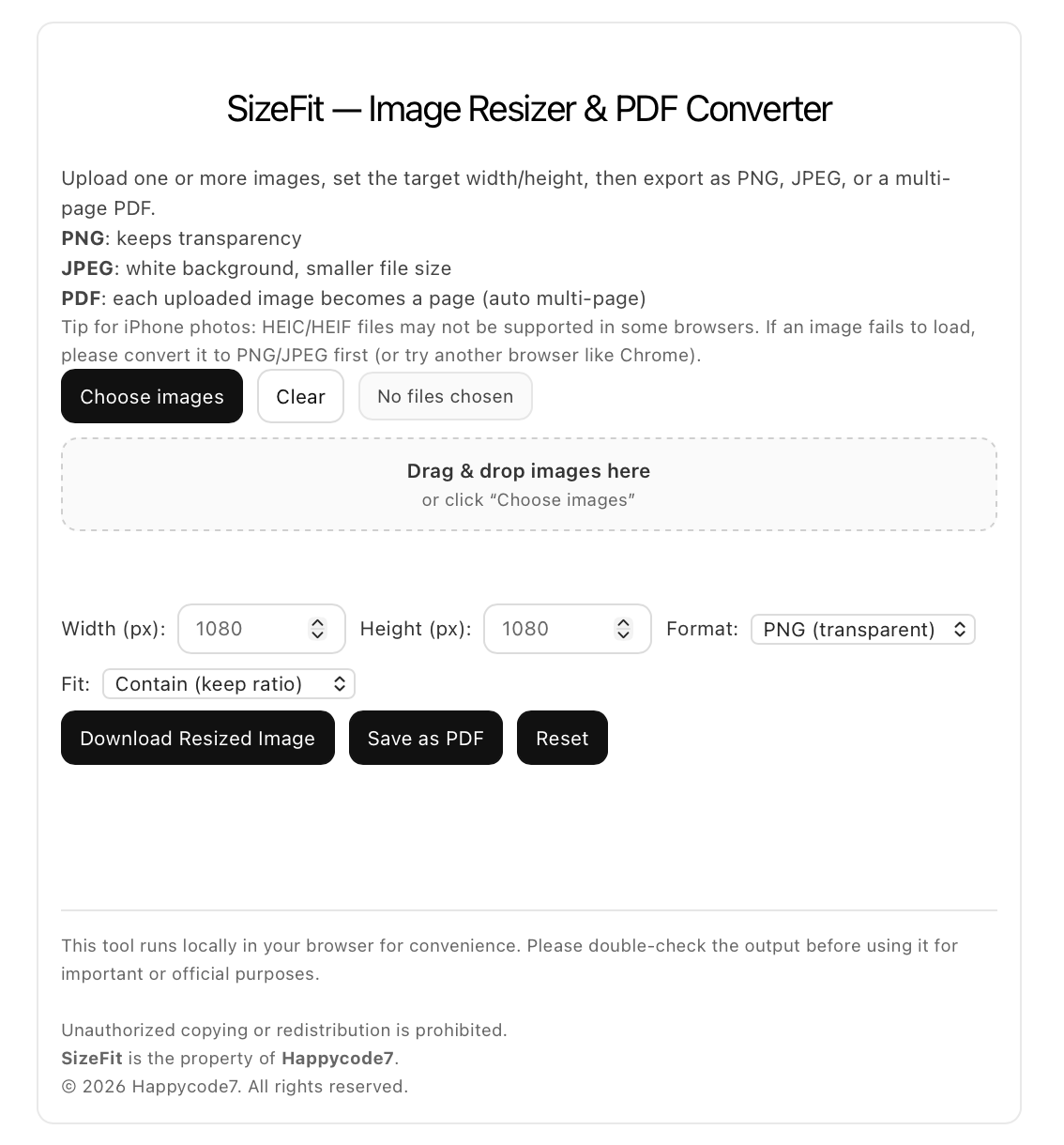
Preparing images for uploads, forms, online submissions, blog posts, store listings, or document sharing often takes longer than expected. File dimensions do not match the required size, transparent backgrounds break after conversion, iPhone photos arrive in HEIC, and multiple images need to be combined into one PDF in a clean and simple way. SizeFit is built for that exact kind of workflow. Based on the shared code, this tool lets users upload one or more images, set a target width and height, export in PNG or JPEG, and save multiple uploaded images as a multi-page PDF directly in the browser.
What makes this useful for international users is not exaggerated marketing, but practical file handling. Many users actively look for an image resizer, PNG to PDF workflow, JPEG converter, HEIC to JPG help, or a quick photo to PDF option when preparing files for websites, applications, e-commerce uploads, forms, school submissions, and cross-device sharing. Current app listings and web demand still heavily reflect those exact use cases, especially around HEIC conversion, PDF export, batch-style image handling, and privacy-conscious local processing.
SizeFit is especially easy to position because its interface is straightforward. Users can choose images, review the original size, enter a target width and height in pixels, select PNG or JPEG, choose how the image should fit, and then download the resized result or export everything as a PDF. The code also states that the tool runs locally in the browser for convenience, which can appeal to users who prefer simpler file handling without routing everyday image preparation through a remote upload workflow.
Another strong point is format practicality. PNG keeps transparency, while JPEG uses a white background and can be better for lighter file sizes, and PDF export turns each uploaded image into a page automatically. That makes the tool useful for users who need quick document-style output from photos, screenshots, product images, receipts, mockups, or visual references. The included jsPDF library is an established client-side JavaScript PDF generation library, which matches the code’s PDF export approach.
This is also relevant because HEIC and HEIF remain a common pain point. The shared code already warns that some browsers may not support HEIC or HEIF files well and recommends converting them first. That warning is sensible: browser support for HEIF/HEIC is still limited overall, so users often need a fallback path when trying to prepare iPhone photos for websites or online forms.
For blog visitors, the value is simple: instead of installing a heavy editor for everyday tasks, they can resize images to fixed dimensions, choose the output style that suits the use case, and convert image sets into a PDF when needed. For creators, sellers, students, remote workers, and general users handling mixed file requirements, that is a practical everyday utility rather than a vague promise. Because the visible code is focused on file preparation, resizing, conversion, and PDF export, this description avoids any unsupported claims beyond those confirmed in the shared snippet.
If you want a lightweight browser-based workflow for resize image online, convert image to PDF, HEIC photo preparation, PNG to JPEG, or multi-image PDF export, SizeFit presents a clear and usable option with a direct interface and familiar file-output logic. It is positioned well for users who search practical terms such as image converter, photo resizer, pdf converter, HEIC to JPG, and prepare images for upload rather than abstract software branding alone. Those terms continue to align with how users discover tools in this category across app stores and the web.
이미지를 업로드하거나, 각종 양식에 첨부하거나, 온라인 제출을 하거나, 블로그 게시물이나 스토어 등록용으로 정리하거나, 문서를 공유하기 위해 준비하는 작업은 생각보다 시간이 오래 걸리는 경우가 많습니다. 파일 크기가 요구 규격과 맞지 않거나, 변환 과정에서 투명 배경이 깨지거나, 아이폰 사진이 HEIC 형식으로 들어오거나, 여러 이미지를 깔끔하고 간단하게 하나의 PDF로 묶어야 하는 상황이 자주 발생하기 때문입니다. SizeFit은 바로 이런 작업 흐름을 위해 만들어진 도구입니다. 공유된 코드를 기준으로 보면, 이 도구는 한 장 또는 여러 장의 이미지를 업로드하고, 원하는 가로·세로 크기를 설정한 뒤, PNG 또는 JPEG로 내보내거나 여러 이미지를 브라우저에서 직접 다중 페이지 PDF로 저장할 수 있도록 구성되어 있습니다.
이 도구가 해외 사용자에게 유용한 이유는 과장된 홍보 문구 때문이 아니라, 실제로 필요한 파일 처리 기능에 충실하기 때문입니다. 많은 사용자들은 웹사이트 업로드, 지원서 제출, 이커머스 등록, 각종 양식 작성, 학교 과제 제출, 기기 간 파일 공유를 준비하는 과정에서 image resizer, PNG to PDF, JPEG converter, HEIC to JPG, photo to PDF 같은 기능을 적극적으로 찾습니다. 현재 앱 목록과 웹상의 수요 역시 HEIC 변환, PDF 내보내기, 다중 이미지 처리, 그리고 개인 정보 노출을 줄일 수 있는 로컬 처리 방식과 같은 활용 사례에 계속 집중되어 있습니다.
SizeFit은 인터페이스가 단순하다는 점에서도 설명하기 쉬운 도구입니다. 사용자는 이미지를 선택하고, 원본 크기를 확인한 뒤, 원하는 가로·세로 픽셀 값을 입력하고, PNG 또는 JPEG 형식을 선택하고, 이미지가 어떤 방식으로 맞춰질지 지정한 다음, 리사이즈된 결과를 다운로드하거나 전체 이미지를 PDF로 내보낼 수 있습니다. 또한 코드에는 이 도구가 편의를 위해 브라우저 안에서 로컬로 실행된다고 적혀 있어, 일상적인 이미지 준비 작업을 위해 파일을 외부 업로드 경로로 보내지 않고 보다 단순하게 처리하고 싶어 하는 사용자에게 매력적으로 보일 수 있습니다.
또 하나의 강점은 파일 형식 측면에서의 실용성입니다. PNG는 투명 배경을 유지하고, JPEG는 흰 배경을 사용하며 더 가벼운 파일 크기에 유리할 수 있습니다. PDF 내보내기 기능은 업로드한 각 이미지를 자동으로 한 페이지씩 구성합니다. 그래서 사진, 스크린샷, 상품 이미지, 영수증, 목업, 시각 자료 등을 빠르게 문서 형태로 정리해야 하는 사용자에게 특히 유용할 수 있습니다. 함께 포함된 jsPDF 라이브러리는 클라이언트 측 JavaScript 기반 PDF 생성 라이브러리로 잘 알려져 있으며, 코드에 들어 있는 PDF 내보내기 방식과도 일치합니다.
이 점은 HEIC와 HEIF가 여전히 많은 사용자에게 불편 요소라는 점에서도 중요합니다. 공유된 코드에는 일부 브라우저가 HEIC 또는 HEIF 파일을 제대로 지원하지 못할 수 있으니 먼저 변환하라는 안내가 이미 포함되어 있습니다. 이 경고는 타당합니다. 전체적으로 보더라도 브라우저의 HEIF/HEIC 지원은 아직 제한적인 편이기 때문에, 사용자는 아이폰 사진을 웹사이트나 온라인 양식에 맞게 준비할 때 대체 변환 경로가 필요한 경우가 많습니다.
블로그 방문자 입장에서 이 도구의 장점은 명확합니다. 일상적인 작업을 위해 무거운 편집 프로그램을 설치하는 대신, 이미지를 정해진 크기로 조정하고, 용도에 맞는 출력 형식을 선택하고, 필요하면 이미지 묶음을 PDF로 변환할 수 있습니다. 창작자, 판매자, 학생, 원격 근무자, 그리고 다양한 파일 요구 사항을 처리해야 하는 일반 사용자에게 이것은 막연한 홍보 문구가 아니라 실질적인 일상용 도구라고 볼 수 있습니다. 보이는 코드가 파일 준비, 리사이즈, 변환, PDF 내보내기에 초점을 두고 있기 때문에, 이 설명 역시 공유된 코드에서 확인된 범위를 넘어서는 주장 없이 작성되어 있습니다.
온라인에서 이미지 크기를 조정하거나, 이미지를 PDF로 변환하거나, HEIC 사진을 준비하거나, PNG를 JPEG로 바꾸거나, 여러 이미지를 하나의 PDF로 내보내는 가벼운 브라우저 기반 작업 흐름을 원한다면, SizeFit은 직관적인 인터페이스와 익숙한 출력 방식으로 분명하고 사용하기 쉬운 선택지가 될 수 있습니다. 이 도구는 추상적인 브랜드 설명보다 image converter, photo resizer, pdf converter, HEIC to JPG, prepare images for upload처럼 실제 사용자가 검색하는 실용적인 표현에 더 잘 맞는 위치에 있습니다. 그리고 이런 검색어들은 지금도 앱 스토어와 웹에서 이 범주의 도구를 찾는 방식과 잘 맞아떨어집니다.
Notice: This tool is provided for general file-preparation convenience only. Users are responsible for reviewing image dimensions, file format compatibility, transparency handling, PDF output, and suitability for their own submission, platform, or official use. Availability, compatibility, and results may vary depending on browser, device, operating system, file condition, and source format. The publisher does not guarantee acceptance by third-party services, institutions, marketplaces, or government platforms.
https://blog.naver.com/upttt_/224214569544
How to Add Web App to Your Home Screen
How to Add Web App to Your Home Screen For iPhone Open the website in Safari or Chrome o...
blog.naver.com
#이미지리사이저 #PDF변환 #이미지PDF변환 #사진PDF변환 #이미지크기조절 #ImageResizer #PDFConverter #ImageToPDF #PhotoToPDF #HEICtoJPG #RedimensionarImagen #ConvertidorPDF #ImagenAPDF #HEICaJPG #画像リサイズ #PDF変換 #画像をPDFに変換 #HEICをJPGに変換 #BildResizer #PDFKonverter #BildZuPDF #HEICzuJPG #RedimensionnerImage #ConvertisseurPDF #ImageEnPDF #HEICenJPG


